
How to Use Seasonal Keywords in Google Ads (The Right Way)
April 3, 2026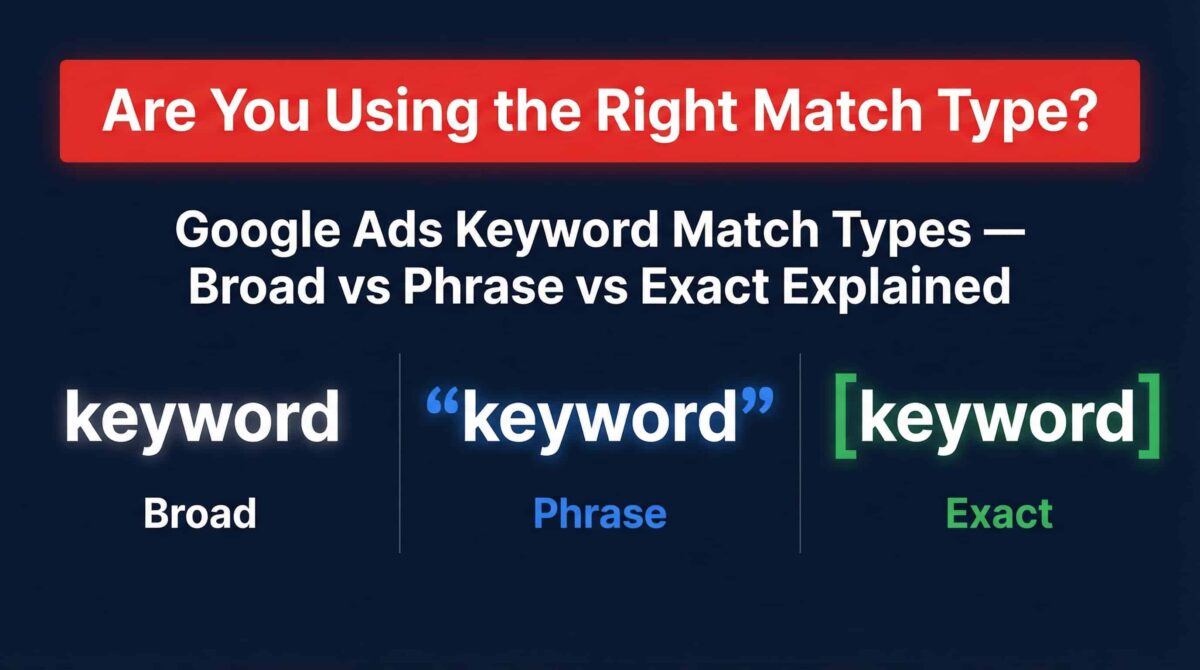
If you have ever launched a Google Ads campaign and wondered why you are getting clicks from completely irrelevant searches, keyword match types are almost always the culprit. This is one of the most foundational settings in Google Ads, and it is also one of the most commonly misconfigured. I see it in nearly every account I audit.
Choosing the right match type dictates the entire trajectory of your campaign. Choose too wide, and you are paying for traffic that will never convert. Choose too narrow, and you might be leaving real buyers on the table.
In this comprehensive guide, we will break down the three core keyword match types—Broad, Phrase, and Exact—and explore the advanced layered strategies that separate amateur accounts from professional, highly profitable campaigns.
1. What Are Keyword Match Types and Why Do They Matter?
Keyword match types are a set of rules that tell Google how closely a user’s search query needs to match your keyword before your ad is eligible to show. They are the control mechanisms that govern your ad spend.
Imagine you are running a campaign for a high-end coffee shop selling “artisan espresso beans.” If you do not use match types correctly, Google might show your ad to someone searching for “cheap instant coffee.” You pay for the click, but the user bounces immediately because you do not offer what they want.
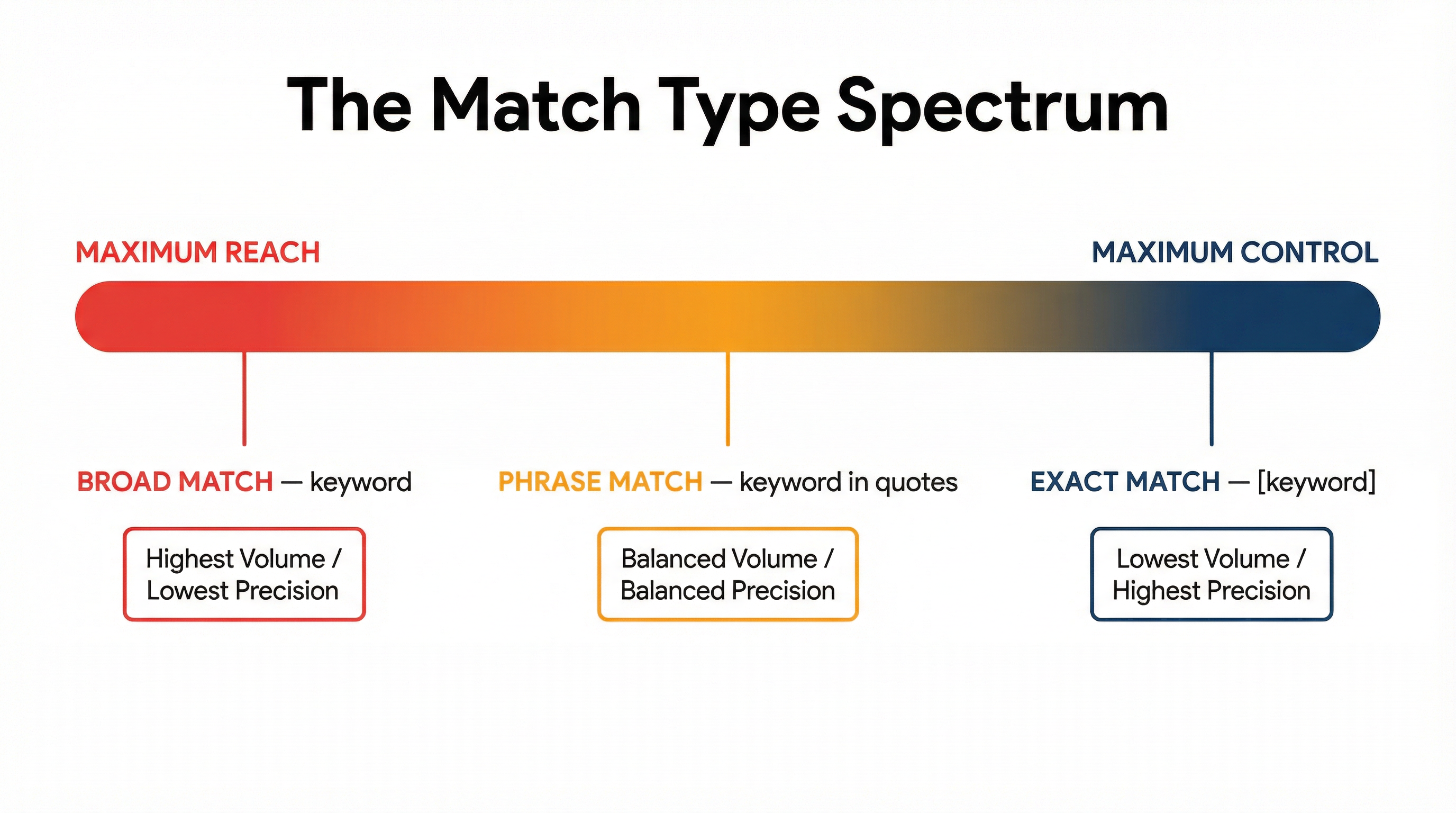
Match types exist on a spectrum of control versus reach:
- Maximum Reach (Lowest Control): Broad Match
- Balanced Reach & Control: Phrase Match
- Maximum Control (Lowest Reach): Exact Match
Understanding where to deploy each of these along the spectrum is the key to scaling a Google Ads account profitably.
2. Broad Match: Maximum Reach, Maximum Risk
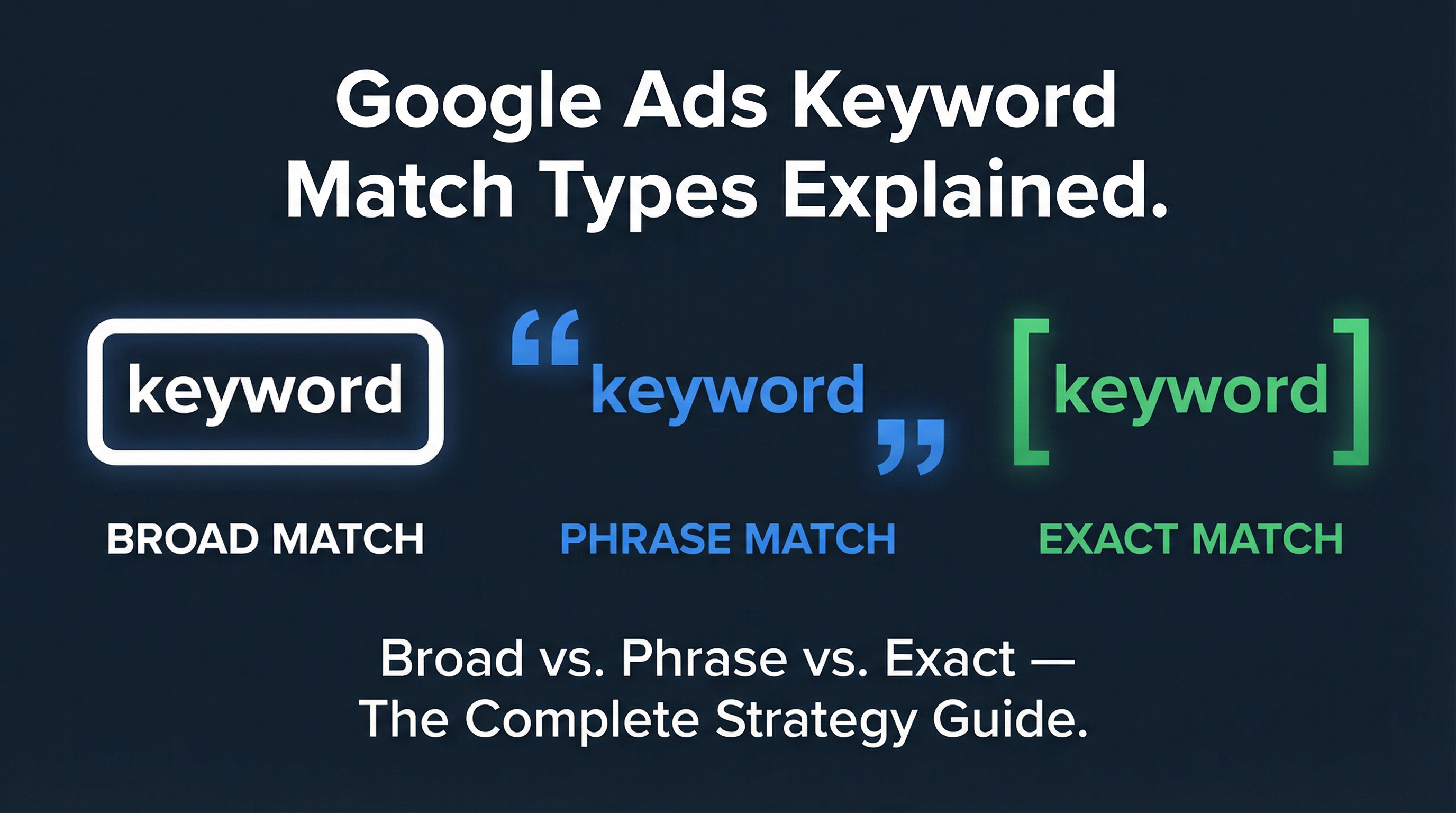
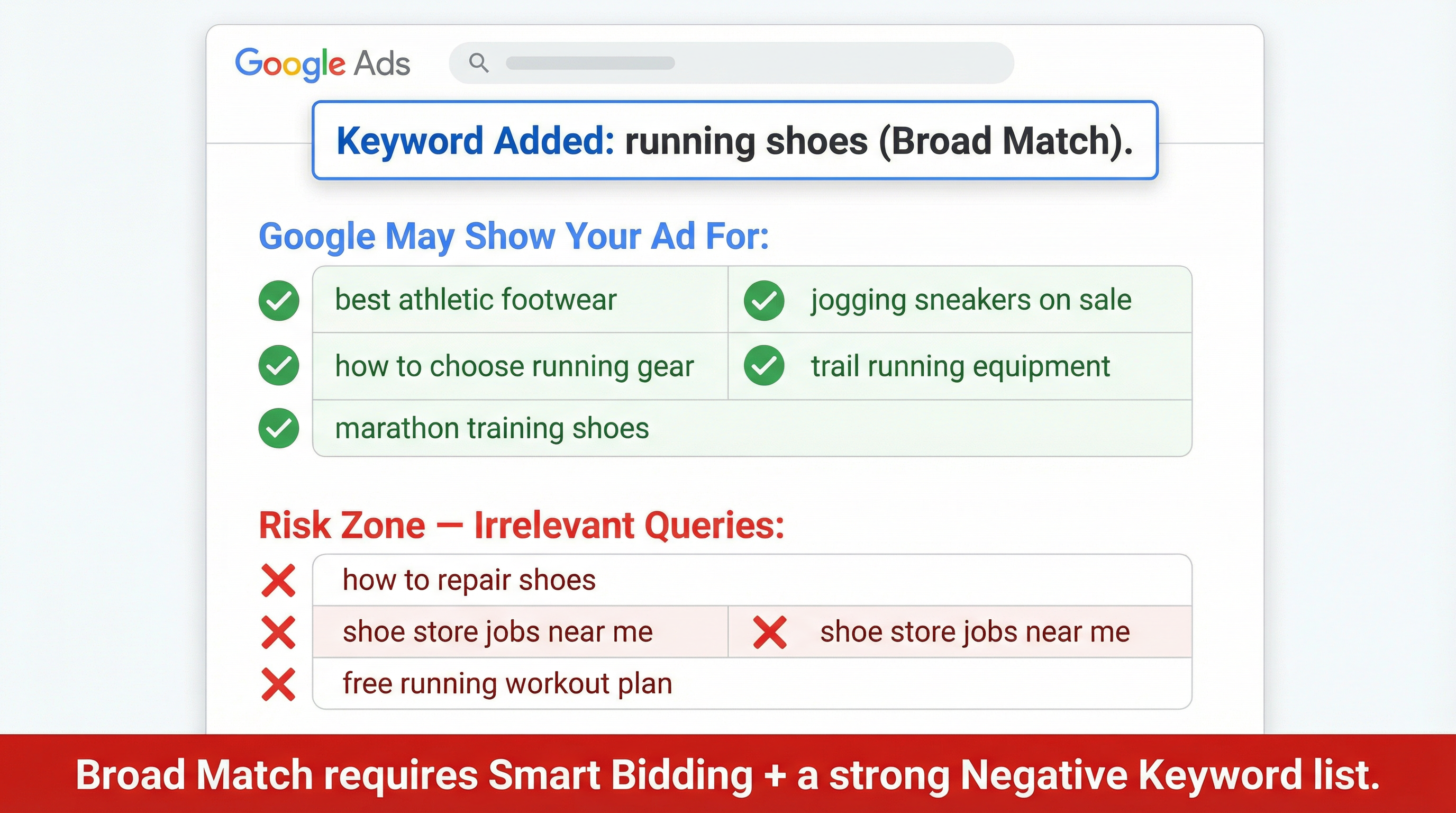
Broad match is the default setting in Google Ads. When you add a keyword without any special formatting (e.g., running shoes), Google treats it as broad match.
How Broad Match Works
Google will show your ad for searches it considers “related” to your keyword. This includes synonyms, misspellings, related topics, and variations you never intended to target. Google’s algorithm uses the user’s recent search activities, the content of your landing page, and other keywords in your ad group to determine relevance.
The Pros of Broad Match
- Discovery: It is excellent for finding long-tail search queries that you would never have thought to add manually.
- Volume: If you need to spend a large budget quickly and maximize impressions, broad match will get you there.
- Smart Bidding Synergy: When paired with Smart Bidding (like Target CPA or Target ROAS), broad match provides the algorithm with the maximum amount of data to learn from.
The Cons of Broad Match
- Wasted Spend: Without strict negative keyword lists, broad match will bleed your budget dry on irrelevant clicks.
- Low Intent: A user searching for “how to repair running shoes” might trigger your ad for “buy running shoes.” The intent is completely mismatched.
When to Use Broad Match
Broad match is not inherently bad, but it is an advanced tool. You should only use it when your campaign has a robust negative keyword list and enough historical conversion data (at least 30-50 conversions in the last 30 days) for Smart Bidding to effectively filter out the junk.
3. Phrase Match: The Balanced Middle Ground
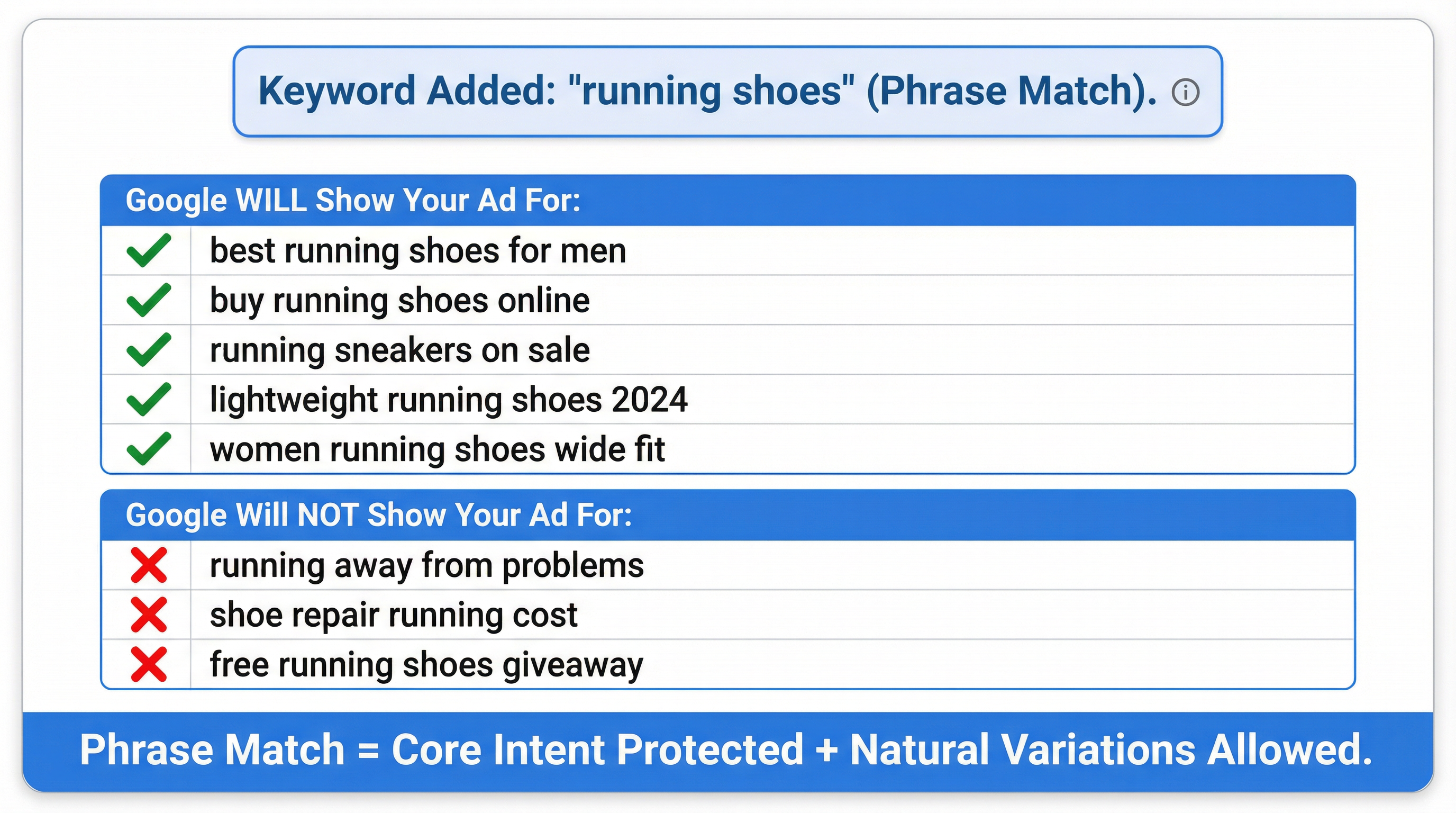
Phrase match gives you more control without locking things down completely. You use it by putting your keyword in quotation marks—like "running shoes".
How Phrase Match Works
Your ad can show when someone’s search includes the meaning of your keyword, with additional words before or after it. In 2021, Google updated phrase match to incorporate the behaviors of the old “broad match modifier.” Today, phrase match captures intent-based variations rather than just strict word-for-word matches.
For example, if your keyword is "running shoes", your ad might show for:
- best running shoes
- running shoes for flat feet
- buy running sneakers (Google understands sneakers = shoes)
It will not show for searches where the core meaning is broken, such as “running away from shoes.”
The Pros of Phrase Match
- Intent Protection: It preserves the core meaning of your keyword while still allowing for natural language variations.
- Expansion Layer: It acts as a great expansion layer once you have identified your top-performing exact match keywords.
The Cons of Phrase Match
- Still Requires Negatives: While safer than broad match, phrase match can still trigger irrelevant queries (e.g., “free running shoes” if “free” is not a negative keyword).
When to Use Phrase Match
Phrase match is the workhorse of most mid-tier accounts. It is ideal for scaling campaigns where exact match is too restrictive, but broad match is too risky.
4. Exact Match: Fewer Clicks, Better Ones
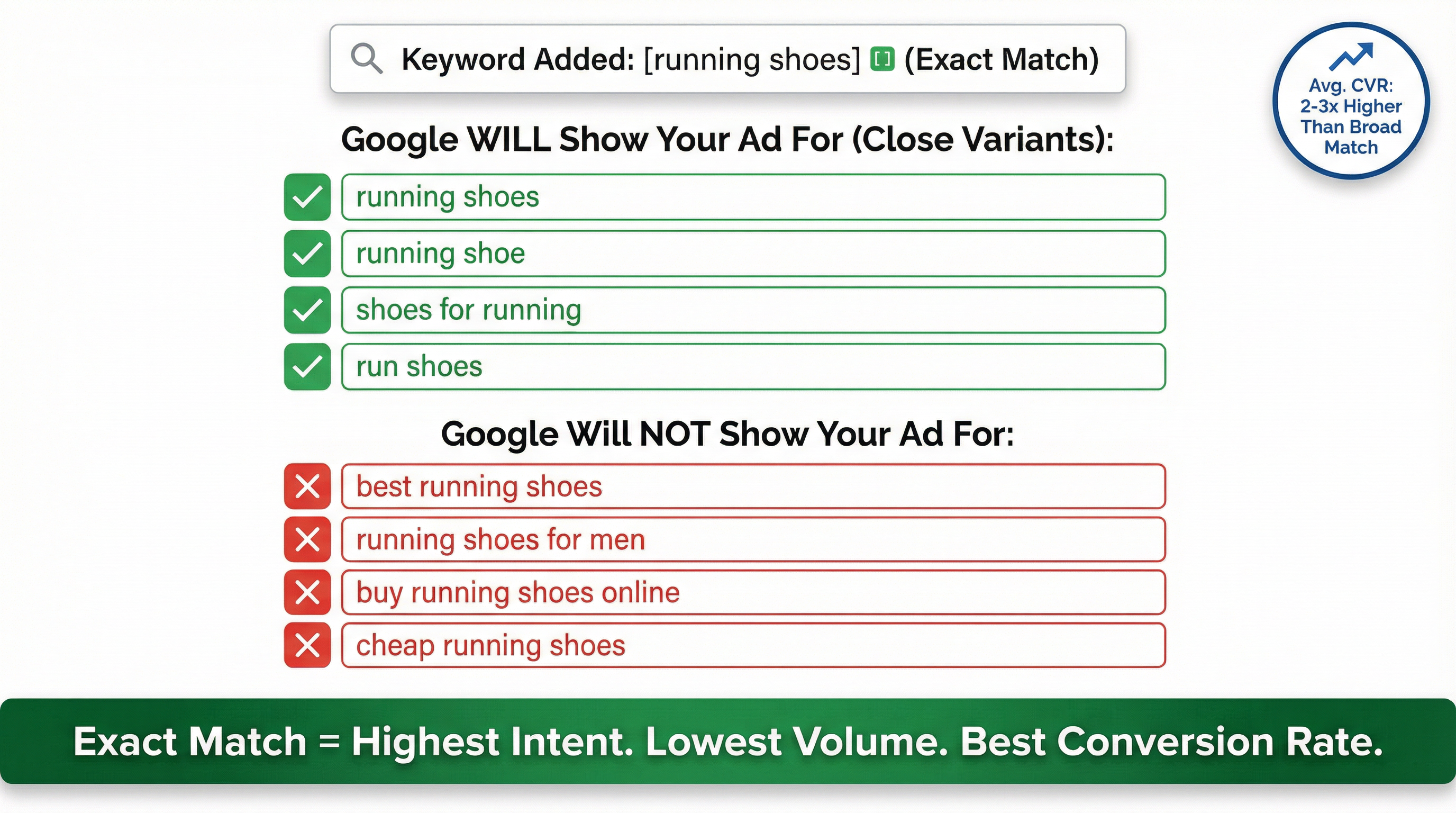
Exact match gets avoided by beginners because the search volume looks low. That is a massive mistake. You use exact match by wrapping your keyword in square brackets—like [running shoes].
How Exact Match Works
Your ad shows for searches that closely match the exact meaning of that keyword. It does not allow for extra words before or after. It will trigger for plurals, misspellings, and very close synonyms, but the intent must be identical.
If your keyword is [running shoes], your ad might show for:
- running shoes
- running shoe
- shoes for running
It will not show for “best running shoes” or “running shoes for men.”
The Pros of Exact Match
- Highest Intent: You know exactly what the user is searching for, allowing you to tailor your ad copy and landing page perfectly.
- Highest Conversion Rate: Because the intent is so clear, exact match keywords consistently outperform other match types on conversion rate.
- Budget Efficiency: You waste almost zero spend on irrelevant queries.
The Cons of Exact Match
- Low Volume: It severely restricts your reach. You cannot build a high-spending account on exact match alone.
- Maintenance Heavy: You have to manually add hundreds of variations to capture all the different ways people search.
When to Use Exact Match
Exact match should be the foundation of your account. Start your campaigns here to gather clean data, establish a strong Quality Score, and ensure your initial budget goes toward the highest-intent buyers.
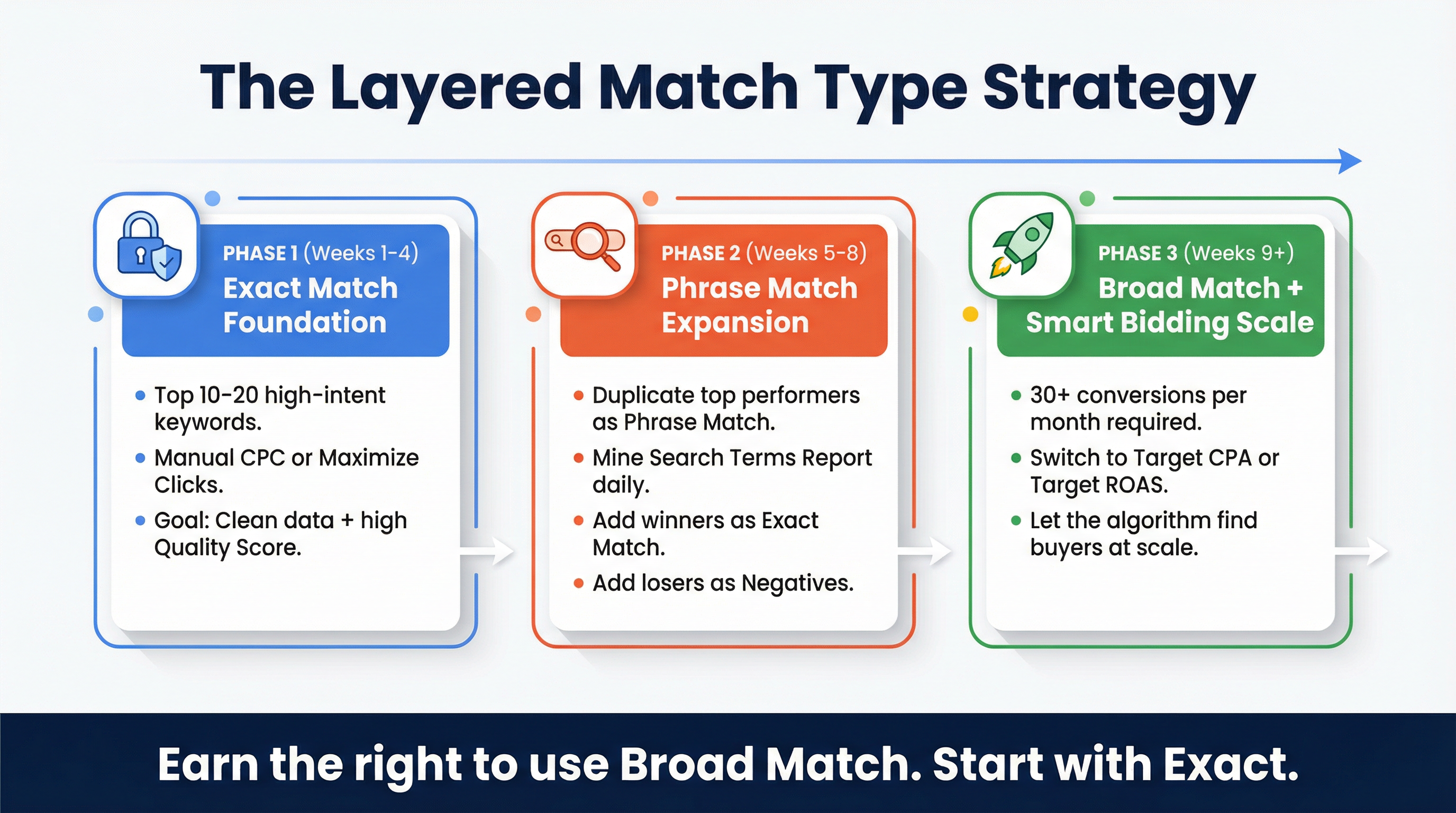
5. The Layered Match Type Strategy That Actually Works
The biggest mistake advertisers make is choosing one match type and sticking to it exclusively. Professional media buyers use a layered approach, utilizing all three match types at different stages of a campaign’s lifecycle.
Here is the exact framework I use when structuring new Google Ads campaigns:
Phase 1: The Exact Match Foundation (Weeks 1-4)
When launching a new campaign, the algorithm has no data, and your budget is at its most vulnerable.
- Identify your 10-20 highest-intent keywords (e.g.,
[buy artisan espresso beans],[b2b accounting software]). - Set them all to Exact Match.
- Use Manual CPC or Maximize Clicks bidding.
- The Goal: Gather clean, highly relevant data. Establish a high Click-Through Rate (CTR) and strong Quality Scores. Do not worry about massive volume yet; focus on profitability and data integrity.
Phase 2: The Phrase Match Expansion (Weeks 5-8)
Once your exact match keywords are converting consistently, it is time to scale.
- Take your top-performing exact match keywords and duplicate them as Phrase Match (e.g.,
"artisan espresso beans"). - Monitor your Search Terms Report daily.
- Add any new, profitable search queries as Exact Match keywords.
- Add any irrelevant search queries as Negative Keywords.
- The Goal: Cast a slightly wider net to find long-tail variations while maintaining strict control over intent.
Phase 3: The Broad Match + Smart Bidding Scale (Weeks 9+)
Only proceed to this phase when your campaign is generating at least 30 conversions per month and you have a massive, battle-tested negative keyword list.
- Switch your bidding strategy to Target CPA or Target ROAS.
- Introduce Broad Match versions of your absolute best-performing keywords.
- The Goal: Let Google’s machine learning algorithm use your historical conversion data to find buyers across a massive range of search queries that you could never predict manually.
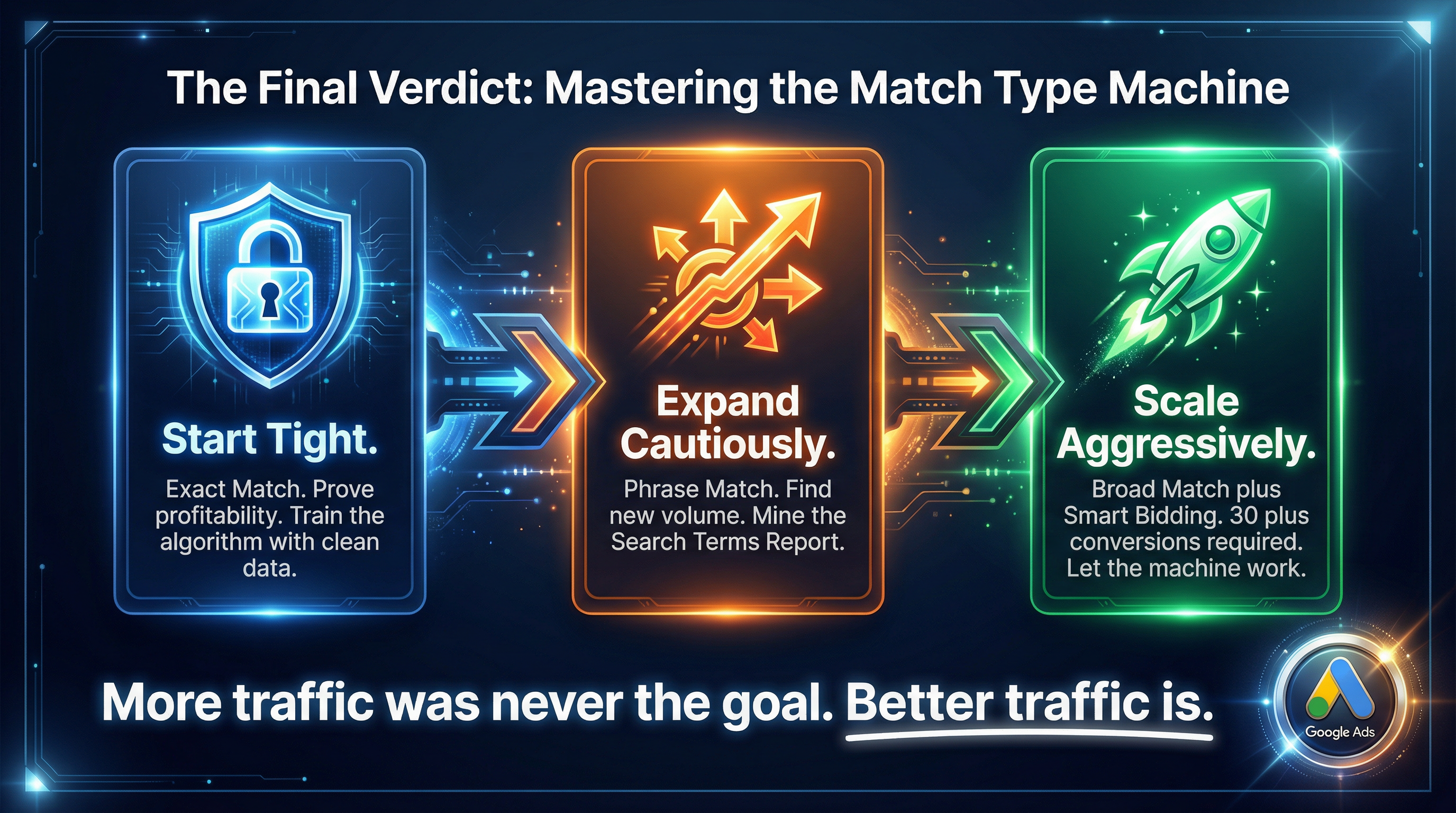
The principle behind this layered strategy is simple: more traffic was never the goal. Better traffic is. You earn the right to use broad match by proving your exact match works.
6. The Critical Role of Negative Keywords
You cannot discuss match types without discussing negative keywords. If match types are the accelerator, negative keywords are the brakes.
A negative keyword prevents your ad from showing when a specific word or phrase is part of the user’s search query. Just like regular keywords, negative keywords have match types:
- Negative Broad Match:
-cheap. Your ad won’t show if the search contains the word “cheap,” regardless of order. - Negative Phrase Match:
-"cheap shoes". Your ad won’t show if the search contains the exact phrase “cheap shoes.” - Negative Exact Match:
-[cheap shoes]. Your ad won’t show only if the search is exactly “cheap shoes” and nothing else.
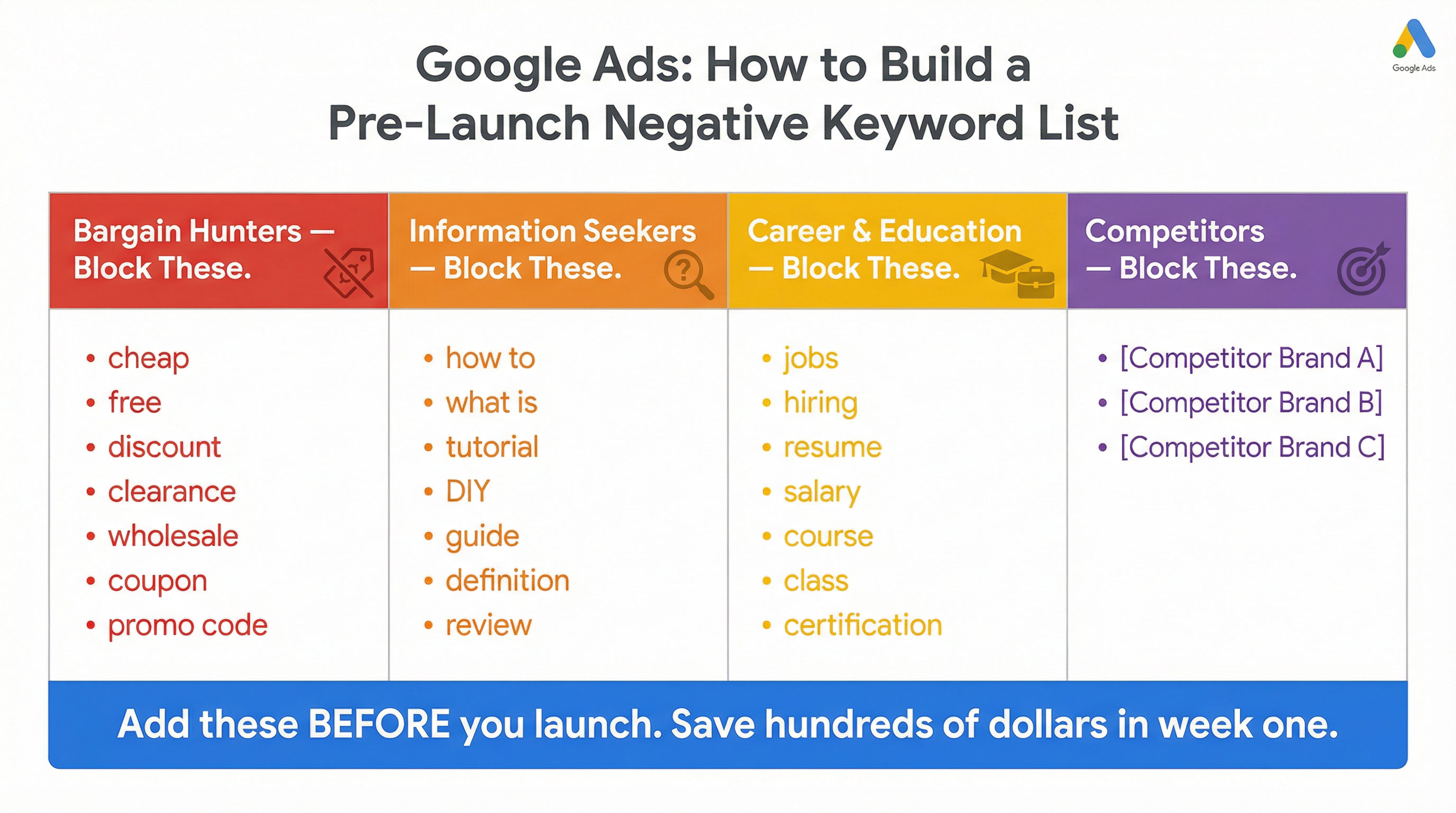
Building a Pre-Launch Negative List
Before you ever launch a campaign—especially if you are using phrase or broad match—you must build a foundational negative keyword list. This should include:
- Bargain Hunters: cheap, free, discount, clearance, wholesale
- Information Seekers: how to, what is, definition, tutorial, DIY
- Career/Education: jobs, hiring, resume, salary, course, class
- Competitors: Unless you are running a specific competitor conquesting campaign, add competitor brand names as negatives.
By proactively blocking these terms, you save hundreds of dollars in the first week alone.
7. Match Types and Ad Group Structure (SKAGs vs. STAGs)
How you structure your ad groups heavily influences how you use match types.
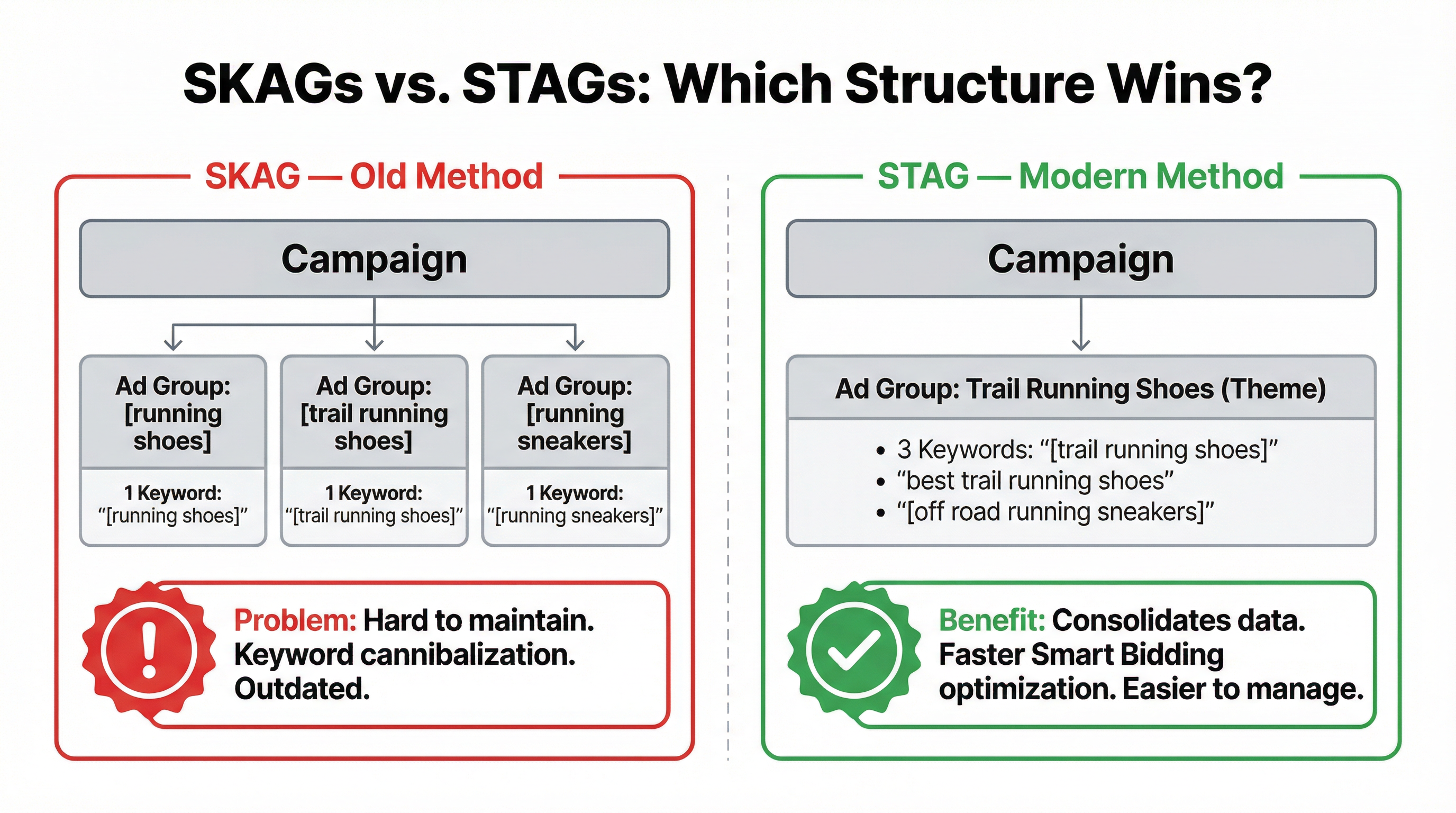
Single Keyword Ad Groups (SKAGs)
Historically, the gold standard was SKAGs. You would create an ad group for a single keyword and include all three match types within it (e.g., [running shoes], "running shoes", +running +shoes). You would then write highly specific ad copy for that one keyword.
While this offered ultimate control, Google’s updates to phrase and exact match (making them looser) have made SKAGs incredibly difficult to maintain. They often lead to internal keyword cannibalization.
Single Theme Ad Groups (STAGs)
Today, the preferred structure is STAGs. Instead of grouping by a specific word, you group by a specific theme or intent.
For example, a STAG for “Trail Running Shoes” might include:
[trail running shoes]"best trail running shoes"[off road running sneakers]
This structure works much better with modern Smart Bidding algorithms, as it consolidates data into fewer ad groups, allowing the machine learning to optimize faster.
8. Common Match Type Mistakes to Avoid
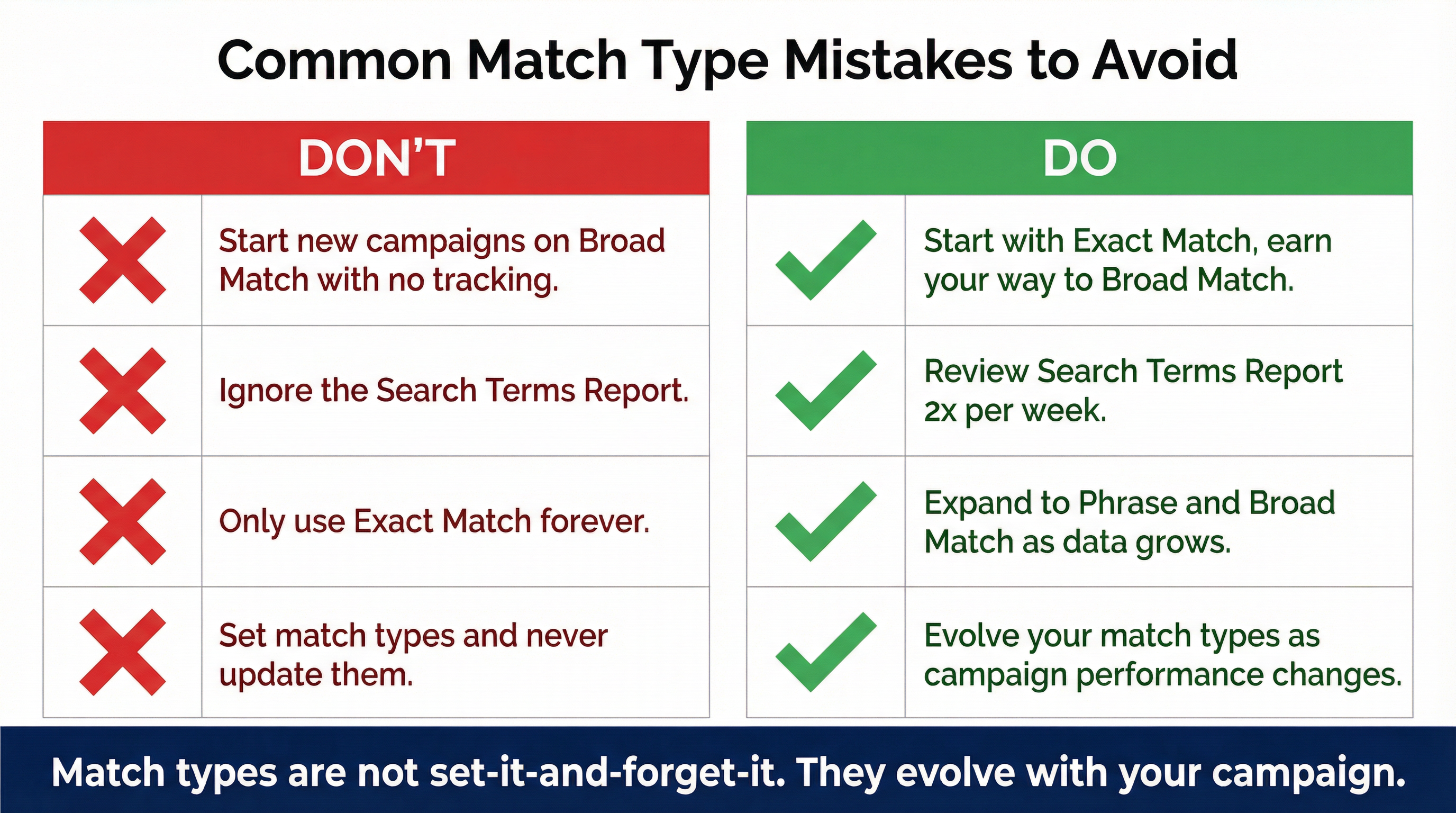
Even experienced marketers fall into these traps. Audit your account today to ensure you aren’t making these critical errors.
Mistake 1: Starting with Broad Match and No Tracking
Starting a brand-new campaign on broad match with no negative keywords and no conversion tracking is the fastest way to burn through a budget with nothing to show for it. I have audited accounts spending hundreds of dollars a day on broad match with zero negative keywords—and the search terms report looked like a completely different business.
Mistake 2: Ignoring the Search Terms Report
Your keyword list is what you want to target. Your Search Terms Report is what you are actually paying for. If you are using phrase or broad match, you must review your Search Terms Report at least twice a week. Add converting terms as exact match keywords, and add irrelevant terms as negatives.
Mistake 3: Over-Restricting with Exact Match
While exact match is safe, it is not scalable. If you only run exact match keywords, you will eventually hit a ceiling where you cannot spend your budget, and your competitors will capture all the emerging, long-tail search trends. You must eventually graduate to phrase and broad match.
Mistake 4: Not Updating Match Types Over Time
An account should evolve. A keyword that starts as phrase match might generate so much irrelevant traffic that it needs to be downgraded to exact match. Conversely, an exact match keyword that converts at a high ROAS should be expanded to phrase match to capture more volume. Match types are not “set it and forget it.”
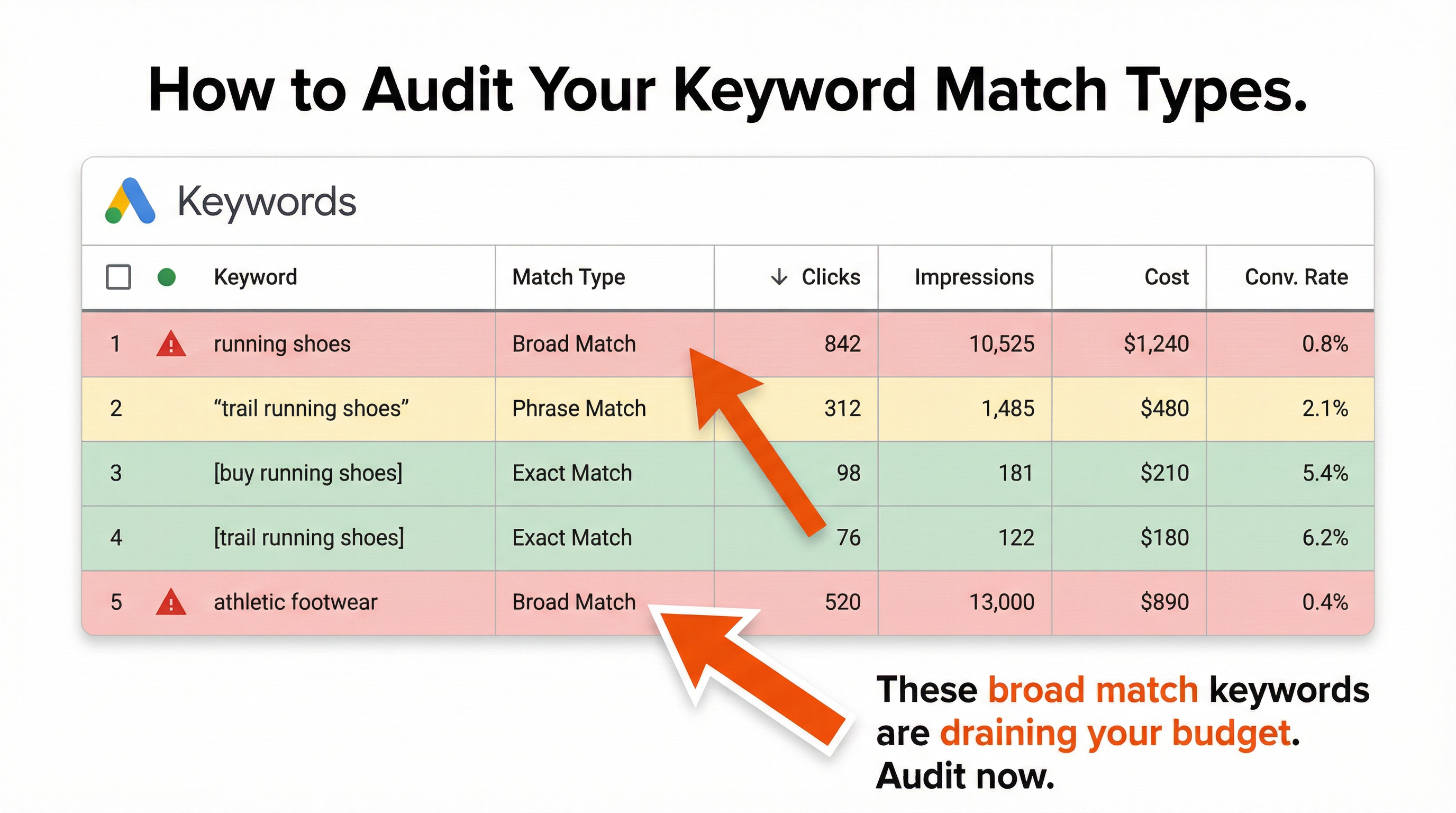
9. How to Audit Your Current Match Types
If you are unsure what match types are running in your account right now, it is time for an audit.
- Open your Google Ads account and navigate to the Keywords tab.
- Look at the Match type column. (If it is not visible, click the Columns icon and add it).
- Filter by Broad Match.
- Select all Broad Match keywords and click Search Terms.
- Sort by Cost (highest to lowest).
Are the search terms you are paying for highly relevant to your business? If you see a lot of junk, you have two immediate choices: pause the broad match keywords, or spend the next three hours building a massive negative keyword list.
10. The Future of Match Types and AI
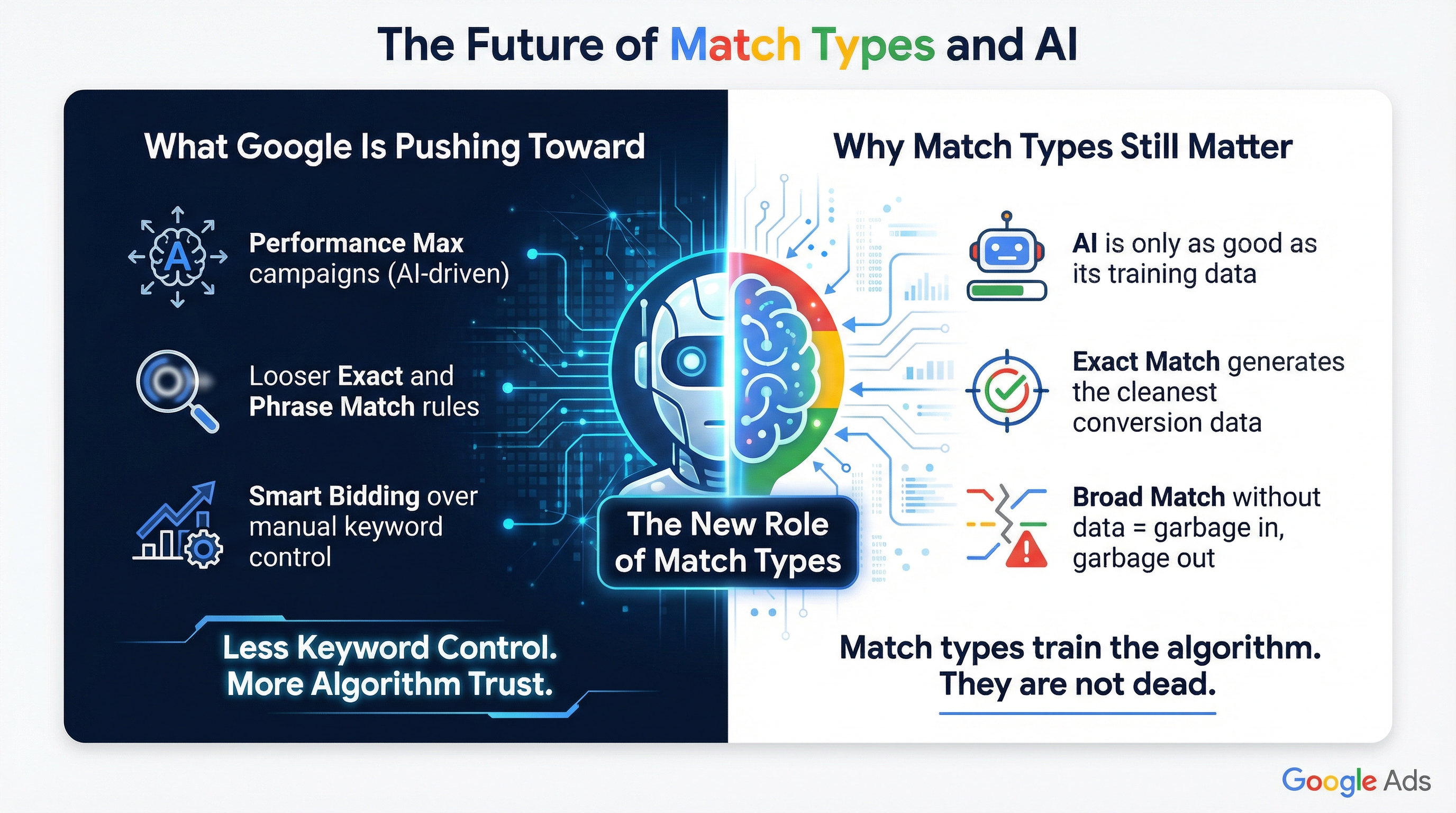
Google is pushing heavily toward automation. With the rise of Performance Max campaigns and the loosening of exact and phrase match rules, it is clear that Google wants advertisers to rely less on strict keyword control and more on Smart Bidding and AI.
Does this mean match types are dead? Absolutely not.
AI is only as good as the data you feed it. If you feed the algorithm garbage data from unstructured broad match keywords, it will optimize for garbage. By using the layered strategy—starting with exact match to generate high-quality conversion data, and slowly expanding to broad match—you are training the AI to find your ideal customers.
Match types are no longer just about filtering traffic; they are about training algorithms.
Ready to Stop Wasting Ad Spend?
If your search terms report is a mess, or if you are struggling to scale your campaigns profitably, the issue is likely rooted in your match type strategy and account structure.
I offer professional Google Ads management services on Upwork. I can audit your current match types, rebuild your negative keyword lists, and implement the layered STAG structure required to win in modern Google Ads.
👉 Book your free Google Ads audit here
11. Bidding Strategies and Match Types: A Symbiotic Relationship
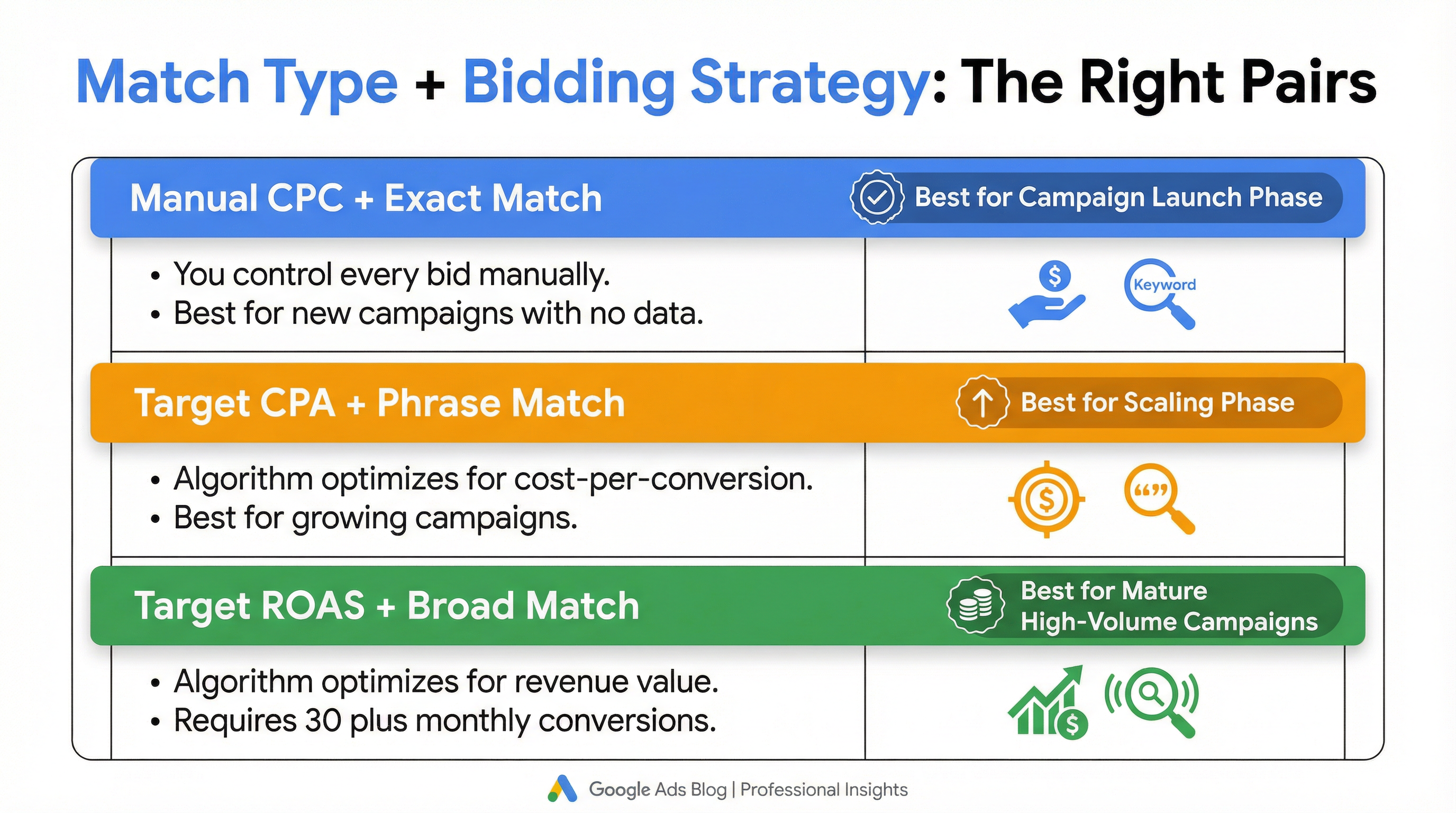
You cannot separate match types from your bidding strategy. They are two sides of the same coin. A match type dictates who can see your ad, while the bidding strategy dictates how much you are willing to pay for them.
Manual CPC Bidding
If you are running Manual CPC, you need maximum control. This is where Exact Match shines. You are manually setting the bid for every single keyword, so you need to know exactly what search query you are buying. Using Broad Match with Manual CPC is extremely dangerous, as you are essentially handing Google a blank check to bid on queries you have never seen.
Target CPA (Cost Per Action)
When you switch to Target CPA, you are telling Google’s algorithm: “I am willing to pay X amount for a conversion. Go find them.” This is where Phrase and Broad Match become powerful. Because the algorithm is optimizing for conversions (not just clicks), it can safely use Broad Match to find long-tail, high-intent queries that you missed, while automatically lowering bids on irrelevant or low-converting queries.
Target ROAS (Return on Ad Spend)
Target ROAS takes this a step further, optimizing not just for a conversion, but for the value of that conversion. In e-commerce, Broad Match + Target ROAS is the holy grail. The algorithm might bid aggressively on a broad search like “premium espresso machines” because it knows that user has a high probability of purchasing a $2,000 machine, while bidding low on “cheap coffee makers.”
12. Advanced Tactic: Match Type Segmentation by Campaign
For large-scale accounts spending tens of thousands of dollars per month, keeping all match types in the same campaign can lead to budget cannibalization. Broad match keywords, by their nature, will eat up the majority of the budget, starving your high-converting exact match keywords.
The Solution: Alpha/Beta Campaign Structures
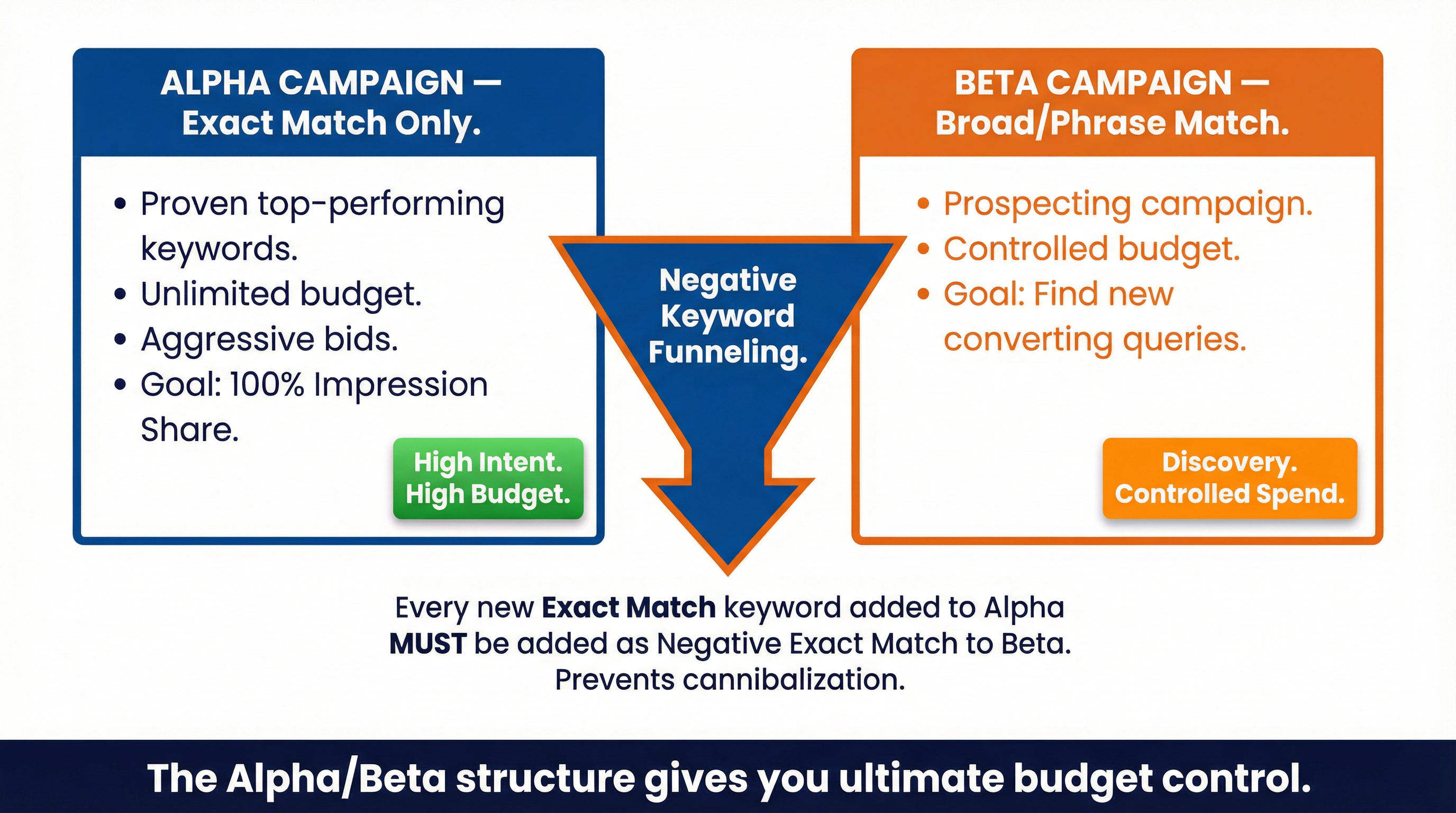
The Alpha/Beta structure solves this by separating match types at the campaign level.
- The Alpha Campaign (Exact Match Only): This campaign houses your proven, top-performing keywords. Because the intent is so high, you give this campaign an unlimited budget (or as high as possible) and aggressive bids. You want 100% Impression Share on these terms.
- The Beta Campaign (Broad/Phrase Match Only): This is your prospecting campaign. It operates on a smaller, controlled budget. Its sole purpose is to find new converting search queries.
- The Critical Link (Negative Keyword Funneling): Every time you add an Exact Match keyword to the Alpha campaign, you must add it as a Negative Exact Match keyword to the Beta campaign. This forces Google to route the exact search query to your Alpha campaign, preventing the two campaigns from competing against each other.
This structure provides ultimate budget control and ensures your best keywords are never starved for spend.
13. Handling Misspellings and Close Variants
One of the most frequent questions I get from clients is: “Do I need to add misspellings of my keywords?”
Ten years ago, the answer was yes. You would have to add [runing shoes], [runing shoos], and [runnig shoes] to your exact match lists.
Today, the answer is absolutely not.
The Power of Close Variants
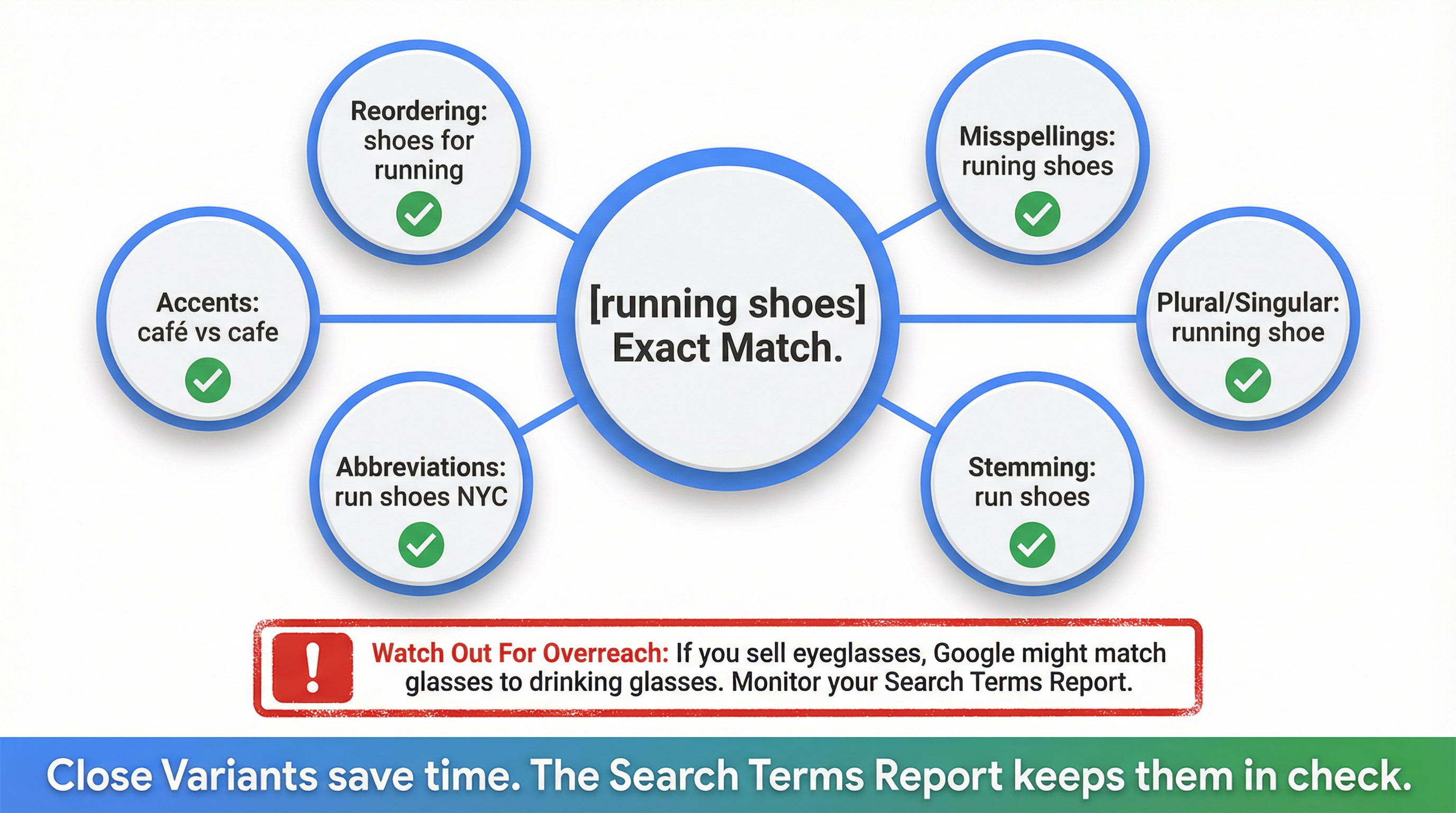
Google’s algorithm has become incredibly sophisticated at understanding natural language, typos, and semantic intent. All match types—even Exact Match—now automatically include “close variants.”
Close variants include:
- Misspellings (runing shoes)
- Singular and plural forms (running shoe)
- Stemming (run shoes)
- Abbreviations (run shoes NYC)
- Accents (café vs cafe)
The Danger of Close Variants
While close variants save time, they can sometimes overreach. For example, if you sell “glasses” (eyewear), Google’s close variants might trigger your ad for “drinking glasses.”
This is why the Search Terms Report remains critical. You must constantly monitor what Google considers a “close variant” and use negative keywords to block the ones that miss the mark.
14. Local Service Businesses vs. E-Commerce: Match Type Differences
The way you use match types changes dramatically depending on your business model.
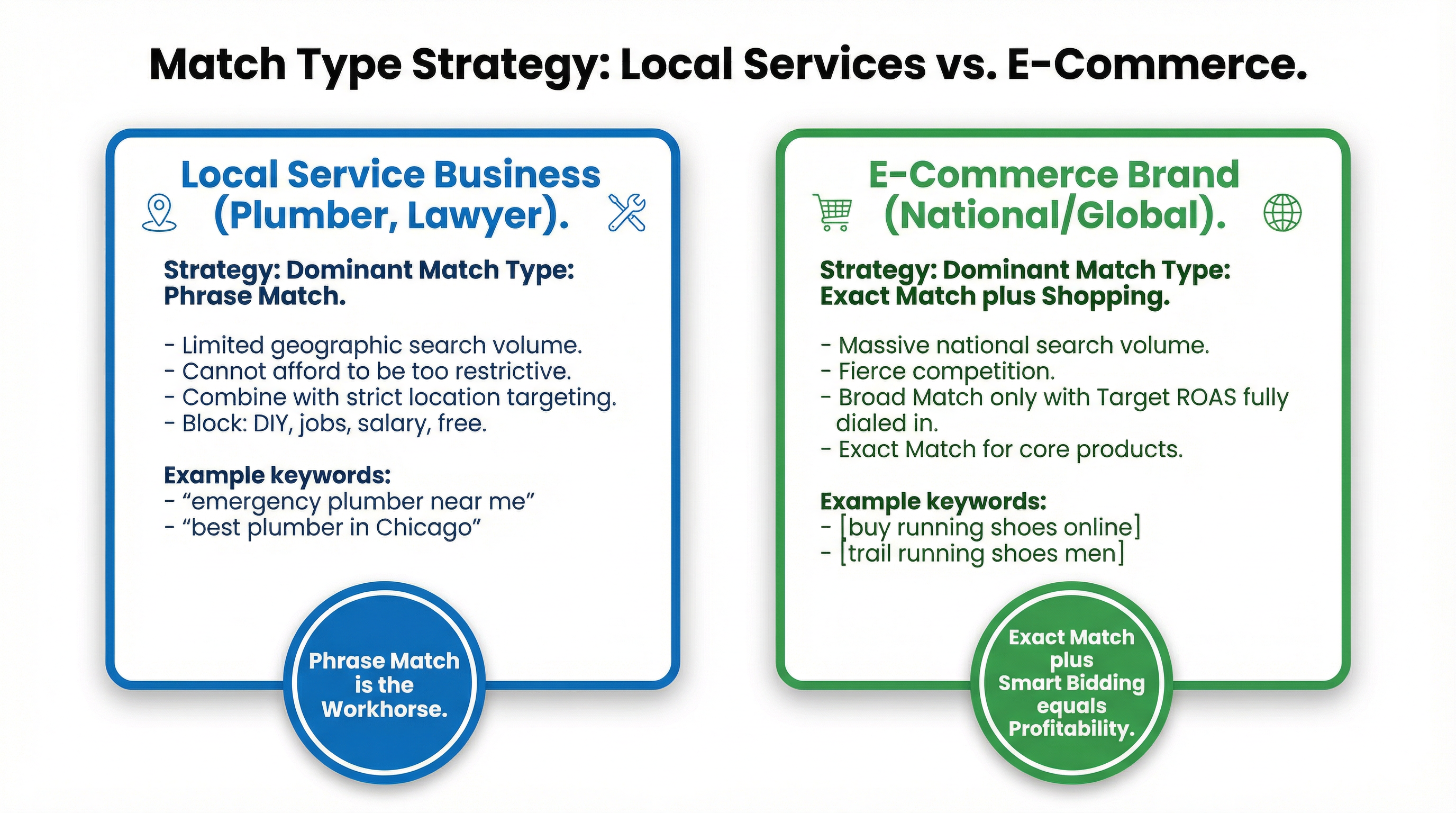
Local Service Businesses (Plumbers, Lawyers, Roofers)
If you are a local plumber, your search volume is naturally restricted by your geographic radius. You cannot afford to be overly restrictive with Exact Match, or you simply won’t get enough clicks to survive.
For local services, Phrase Match is usually the dominant match type. You want to capture queries like “emergency plumber near me,” “best plumber in Chicago,” and “plumber to fix leaking pipe.” You combine this with strict location targeting and robust negative lists (e.g., blocking “DIY,” “jobs,” “salary”).
E-Commerce Brands (National or Global)
E-commerce brands have the opposite problem: massive search volume and fierce national competition. If an e-commerce brand relies too heavily on Phrase or Broad match without strict Smart Bidding, they will bleed cash instantly.
For e-commerce, Exact Match (for core products) and highly structured Google Shopping / Performance Max campaigns are the priority. Broad Match is only introduced when Target ROAS bidding is fully dialed in.
15. The Final Verdict: Mastering the Machine
Google Ads is no longer a platform where you can manually out-bid your competitors on a spreadsheet. It is a machine learning engine.
Keyword match types are the steering wheel of that engine.
If you use Broad Match exclusively, you are taking your hands off the wheel and hoping the car stays on the road. If you use Exact Match exclusively, you are driving in first gear and letting your competitors pass you by.
The secret to scaling Google Ads profitably is the layered approach:
- Start tight with Exact Match to prove profitability and train the algorithm.
- Expand cautiously with Phrase Match to find new volume.
- Scale aggressively with Broad Match + Smart Bidding once you have the data and negative keywords to support it.
Master this progression, and you will stop wasting ad spend and start dominating your market.