


Google Ads Remarketing: How to Set It Up the Right Way
March 30, 2026
Manual CPC Bidding: When It Beats Smart Bidding
April 2, 2026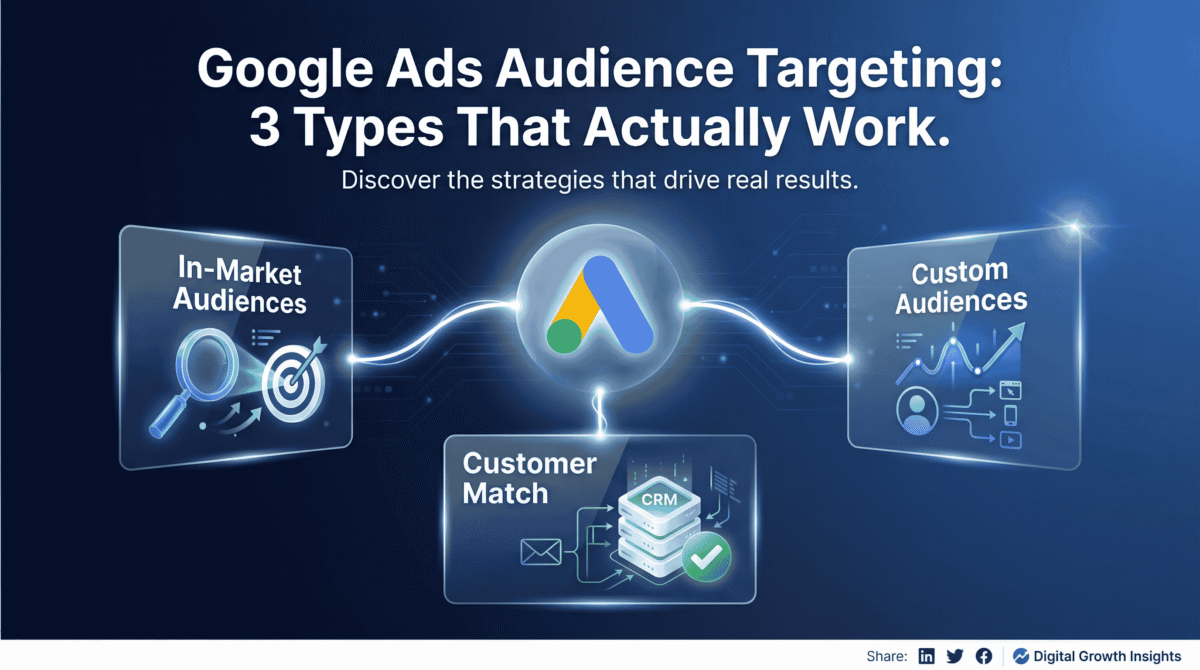
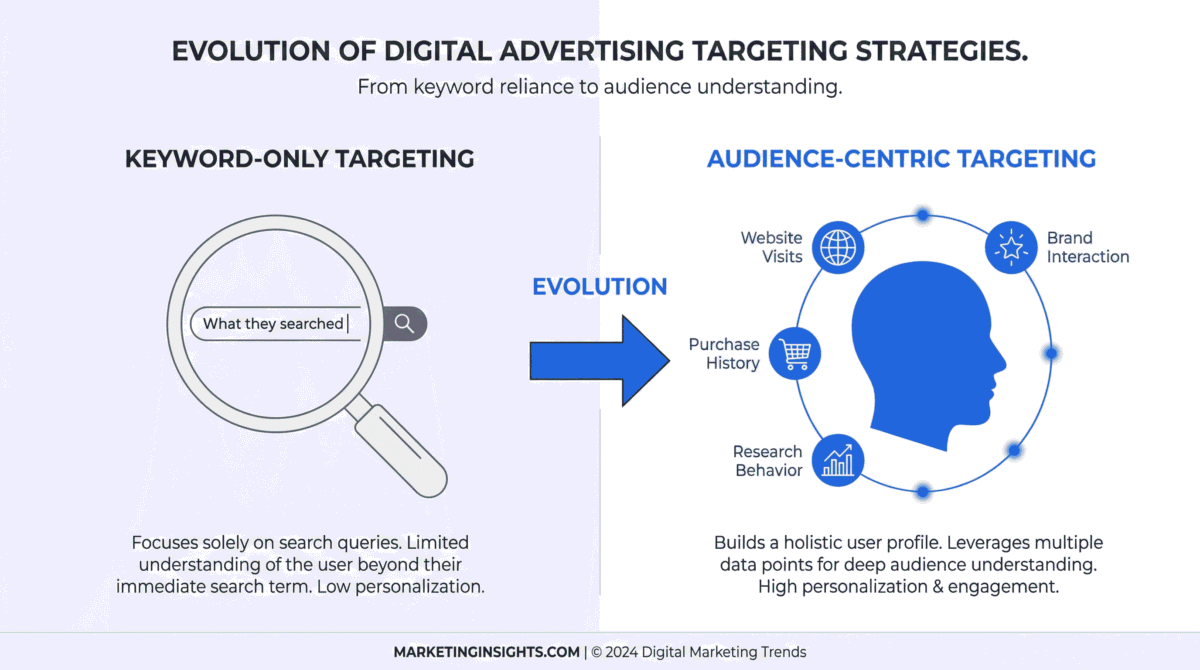
If your Google Ads strategy begins and ends with keywords, you are operating with incomplete information. For years, search intent was the holy grail of digital advertising. Marketers obsessed over finding the perfect combination of exact match keywords to capture users at the precise moment they expressed a need. However, in today’s increasingly complex digital ecosystem, keywords only tell you what someone searched. They fail to reveal who the searcher is, what they have been researching, how they behave online, and whether they already have a relationship with your brand.
This is where audience targeting transforms a standard search campaign into a highly efficient conversion engine. I have audited and managed Google Ads campaigns across dozens of accounts, and audience layering remains consistently one of the most underused levers available to advertisers. Most account managers either neglect to set it up entirely, or they add a single broad audience and promptly forget about it. This oversight leaves significant efficiency and return on ad spend (ROAS) on the table.
In this comprehensive guide, we will explore the three audience types that are essential for modern Google Ads campaigns. We will break down what they are, provide step-by-step implementation guides, and share advanced strategies to help you elevate your account performance.
1. In-Market Audiences: The Foundation of Intent
In-Market Audiences represent users that Google has identified as actively researching a specific product or service category. These are not individuals who casually searched for a term once. Google’s algorithmic signals are based on a sustained pattern of behavior: multiple related searches, visits to specific product pages, engagement with price comparison sites, and time spent reading reviews.
When you leverage In-Market Audiences, you are tapping into Google’s massive data network to identify users who are at the bottom of the funnel and demonstrating high purchase intent.
The Right Way to Start: The Observation Method
One of the most common mistakes advertisers make is immediately restricting their campaign reach by setting In-Market Audiences to “Targeting” mode. This forces the campaign to only show ads to users in that specific audience, which can prematurely choke off valuable traffic.
Instead, the optimal approach is the Observation method.
Step-by-Step Implementation Guide:
1.Navigate to your Google Ads account and select the campaign or ad group you want to optimize.
2.Click on Audiences, keywords, and content in the left-hand menu, then select Audiences.
3.Click the blue pencil icon or Add Audiences.
4.Crucially, select Observation (recommended) rather than Targeting. This allows your ads to continue showing to anyone searching your keywords, but it tags the users who also fall into your selected In-Market categories.
5.Click on Browse, then select What they are actively researching or planning (In-market and life events).
6.Browse or search for categories that align with your product or service. Add relevant segments to your campaign.
7.Save your changes.
Advanced Strategy: Data-Driven Bid Adjustments
Let the Observation audiences run alongside your existing targeting for a minimum of two to four weeks (or until you have statistically significant data). Once you have gathered enough performance data, analyze the conversion rates and cost-per-acquisition (CPA) of these In-Market segments compared to your baseline traffic.
If you find that users in the “In-Market for Enterprise Software” segment are converting at a 30% higher rate than your average user, apply a positive bid adjustment (e.g., +15% or +20%) to that specific audience. This signals to Google’s algorithm that you are willing to pay more for a click from this user because they have a higher probability of converting. Conversely, if a segment is underperforming, you can apply a negative bid adjustment to pull budget away from inefficient traffic.
This is a low-risk, high-information approach. You are not narrowing your reach; you are gathering critical intelligence before committing your budget.
2. Custom Audiences: Targeting Behavioral Patterns, Not Just Searches
While In-Market Audiences are powerful, they are limited to Google’s predefined categories. What happens when your product is highly niche, or the available In-Market categories are simply too broad? This is where Custom Audiences become invaluable.
Custom Audiences allow you to define your own highly specific audience segments based on recent search behavior and website visitation patterns. You can instruct Google to build an audience of users who have searched for specific terms (including competitor brand names) or visited specific URLs.
The true power of Custom Audiences lies in the shift from matching a single search query to matching a behavioral pattern. A user who has visited three different competitor pricing pages in the last two weeks is not just browsing—they are actively evaluating options and are in a prime buying mode.
Step-by-Step Implementation Guide: Building a Custom Segment
1.In your Google Ads account, click on the Tools and settings icon (the wrench) in the top menu.
2.Under the “Shared library” section, select Audience manager.
3.Click the blue plus button and select Custom audience.
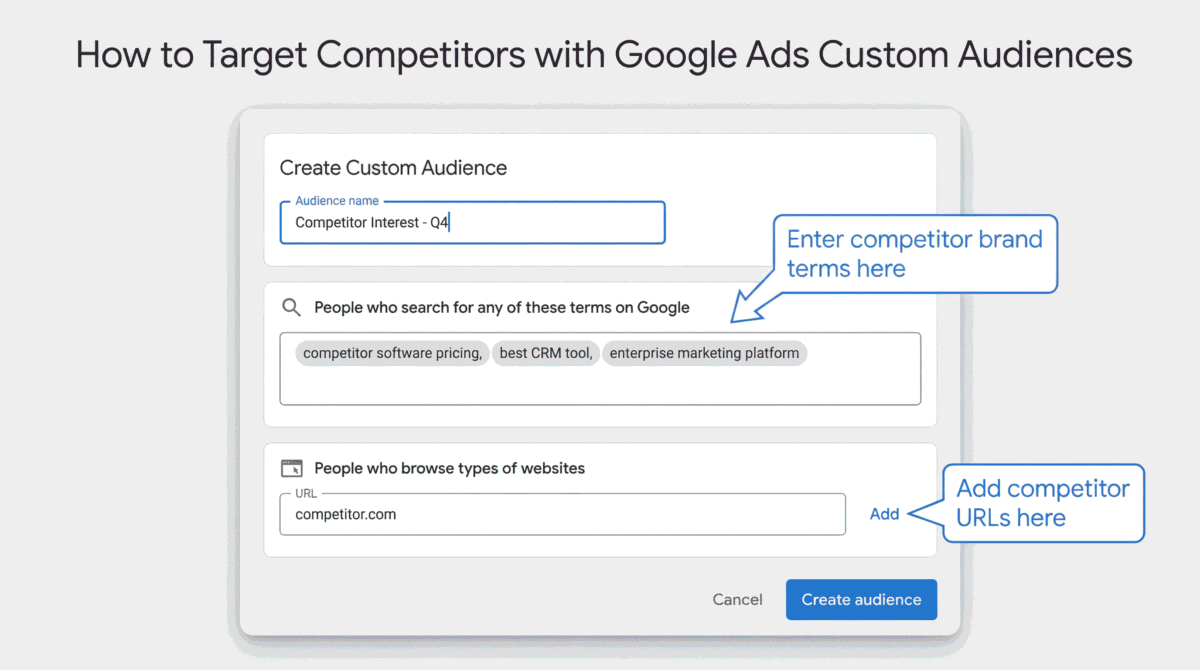
4.Give your audience a descriptive name (e.g., “Competitor URL Visitors – Q3”).
5.You will see two primary options. Select People who search for any of these terms on Google. This is highly effective because it targets users based on their recent search history across Google properties.
6.Enter specific search terms that indicate high intent, including competitor brand names, specific product models, or niche industry terms.
7.Next, you can expand this audience by adding URLs. Click on Expand audience by also including and select People who browse types of websites.
8.Input the URLs of your direct competitors, industry blogs, or specific review sites that your ideal customer would visit during their research phase.
9.Save the audience and apply it to your campaigns (again, starting in Observation mode is recommended for Search campaigns, while Targeting mode is used for Display or Discovery campaigns).
Advanced Strategy: The Competitor Intercept
One of the most effective uses of Custom Audiences is the “Competitor Intercept” strategy. Build a Custom Audience exclusively using the URLs of your top three to five direct competitors, combined with their branded search terms.
Apply this audience to a campaign with a specific ad copy strategy that highlights your unique value proposition (UVP) or a direct comparison (e.g., “Looking for [Competitor]? See Why We’re Rated #1”). This allows you to aggressively target users who are already educated about the market and are currently evaluating your direct competition.
3. Customer Match: The High-Performing Audience Most Advertisers Skip
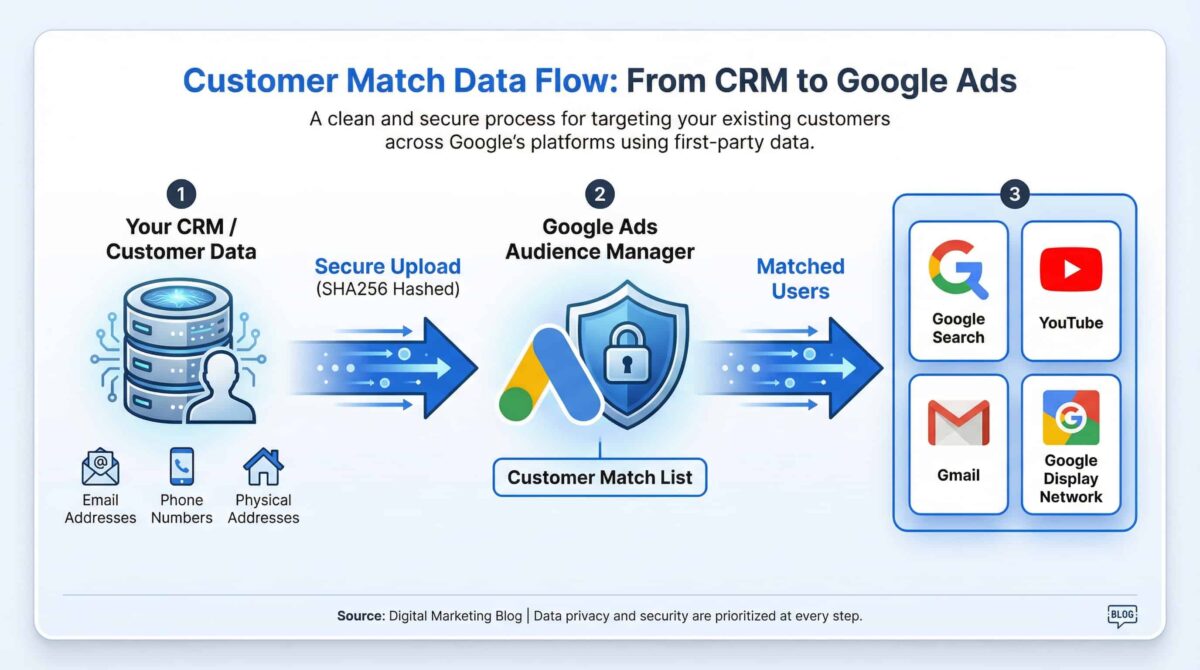
Customer Match is arguably the most powerful audience targeting feature in Google Ads, yet it is frequently the most underutilized. It allows you to upload a list of your existing customers—using email addresses, phone numbers, or physical addresses—and Google matches this data to signed-in Google users. Once matched, you can serve highly targeted ads directly to these individuals across the Google Search Network, YouTube, Gmail, and the Google Display Network.
The reason this segment consistently outperforms others is simple: Trust.
These are individuals who have already had a transaction or a meaningful interaction with your brand. The barrier to conversion is significantly lower than it is for cold traffic. Consequently, the cost-per-conversion (CPA) is often substantially lower, and the return on ad spend (ROAS) is typically much higher.
Most advertisers skip Customer Match because it requires first-party data and a slightly more involved setup process. However, if you have a customer list of any reasonable size (typically 1,000 or more matched users), this is one of the fastest and most reliable ways to improve campaign efficiency without changing a single keyword or bid strategy.
Step-by-Step Implementation Guide: Uploading First-Party Data
1.In your Google Ads account, navigate to the Tools and settings icon (the wrench).
2.Under the “Shared library” section, select Audience manager.
3.Click the blue plus button and select Customer list.
4.Choose the type of data you want to upload (e.g., “Upload a file with customer information”).
5.Prepare your data file. Google provides a template for formatting your CSV file. You must ensure your data is hashed (using SHA256) or allow Google to hash it during the upload process for privacy compliance.
6.Upload your CSV file and map the columns to the correct data types (Email, Phone, First Name, Last Name, Zip, etc.).
7.Check the box confirming that this data was collected in compliance with Google’s policies (i.e., it is first-party data).
8.Click Upload and create.
9.Google will process the list and attempt to match the data. This process can take up to 48 hours. Once matched, the audience will be available to apply to your campaigns.
Advanced Strategy: The LTV Segmentation Approach
Do not simply upload one massive list of “All Customers.” The true power of Customer Match is unlocked through segmentation based on Customer Lifetime Value (LTV).
Segment your CRM data into distinct lists before uploading:
•High-Value VIPs: Customers with the highest lifetime value or most frequent purchases.
•Recent Purchasers: Customers who bought within the last 30 days (ideal for cross-selling or upselling).
•Churned Customers: Customers who haven’t purchased in over a year (ideal for win-back campaigns).
•Lead Non-Converters: Individuals who filled out a form or downloaded a resource but never completed a purchase.
Apply these distinct lists to different campaigns with tailored messaging. For example, you might apply a +50% bid adjustment for your “High-Value VIPs” on generic search terms, knowing they are highly likely to convert again. Conversely, you might use your “Churned Customers” list in a Display or YouTube campaign with a special “We Miss You” discount offer.
4. The Master Strategy: Layering Audiences for Maximum Precision
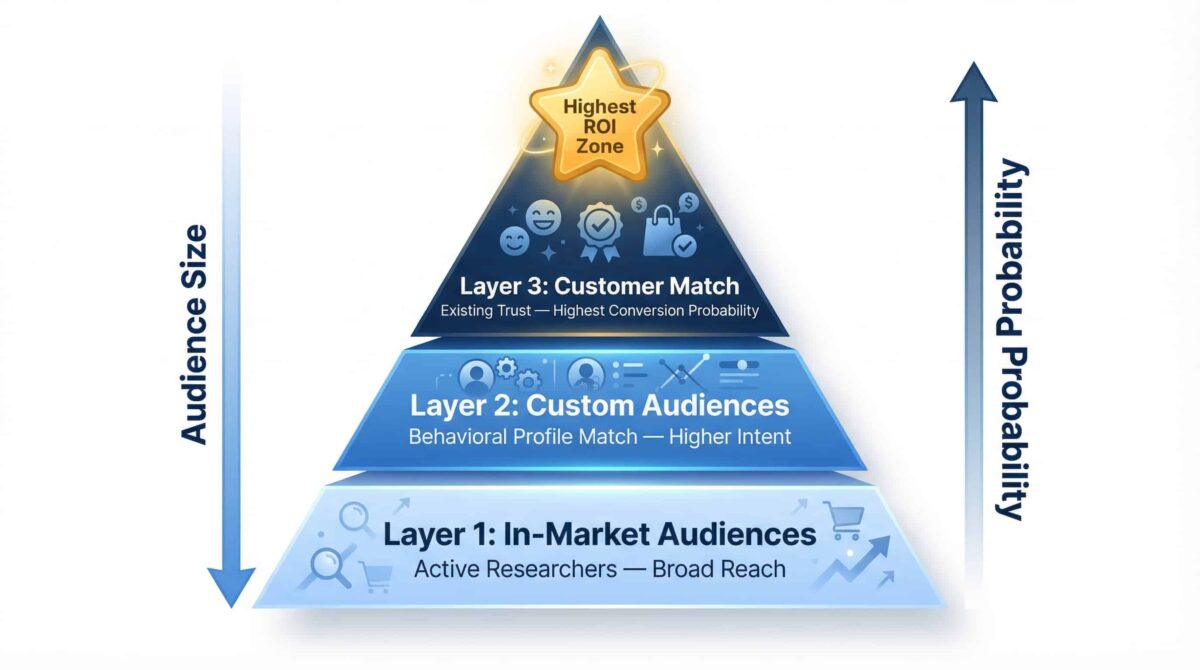
The real leverage in Google Ads audience targeting is not found in using just one of these strategies in isolation. The ultimate goal is to layer all three to create a highly precise, highly efficient targeting matrix.
•Layer 1: In-Market Audiences to capture active researchers at scale.
•Layer 2: Custom Audiences to reach users who match your ideal buyer’s specific behavioral profile and competitor research habits.
•Layer 3: Customer Match to re-engage people who already trust your brand and have a proven track record of conversion.
Each layer adds a new dimension of precision. And precision means you are spending your budget on the individuals most likely to convert, rather than simply paying for anyone who happened to search the right keyword.
How to Implement Audience Layering Effectively
When you layer audiences, you are essentially creating a scoring system for your traffic. Here is how to structure it within a single Search campaign:
1.Start with your core keywords. These define the intent.
2. Add your audiences in Observation mode. Add relevant In-Market, Custom, and Customer Match lists to the campaign.
3. Analyze the data. Allow the campaign to run and gather statistically significant data on how each audience segment performs relative to the baseline.
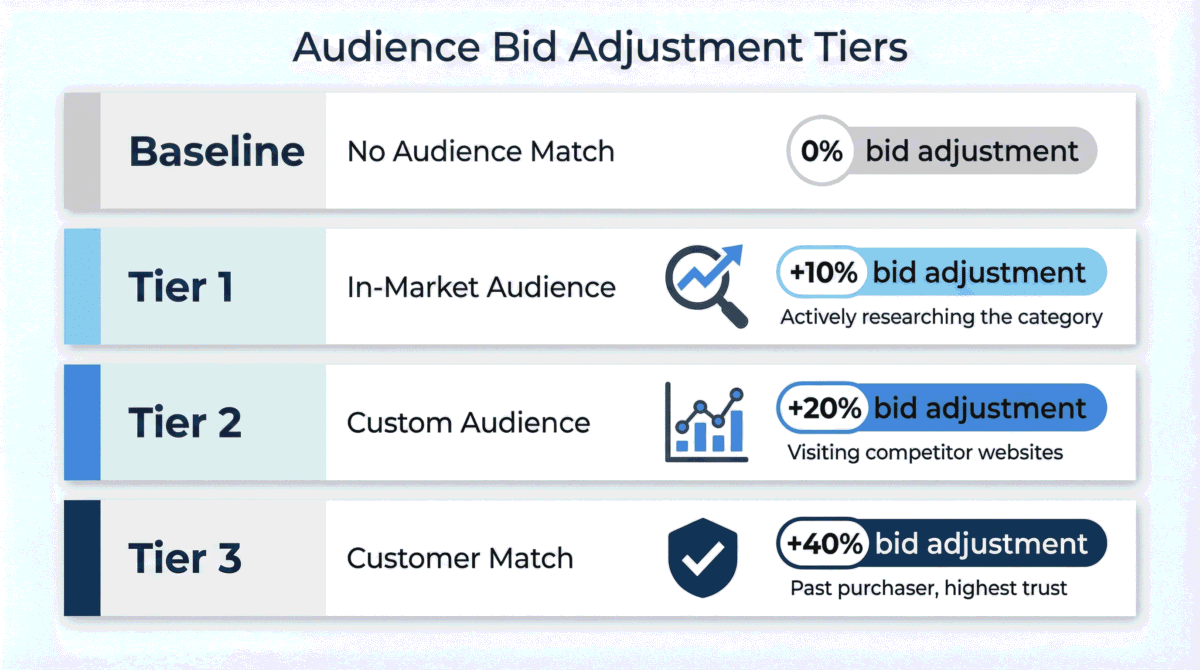
4. Apply tiered bid adjustments.
•Baseline: No audience match (Standard bid)
•Tier 1 (In-Market): +10% Bid Adjustment (They are researching the category)
•Tier 2 (Custom): +20% Bid Adjustment (They are researching your specific competitors)
•Tier 3 (Customer Match): +40% Bid Adjustment (They are past purchasers searching for a related term)
By layering these audiences and applying strategic bid adjustments, you are instructing Google’s algorithm to prioritize the most valuable users, maximizing your return on ad spend and significantly lowering your overall cost-per-acquisition.
5. Common Mistakes to Avoid with Audience Targeting
Even experienced marketers can make critical errors when implementing audience targeting. Here are the most common pitfalls to avoid:
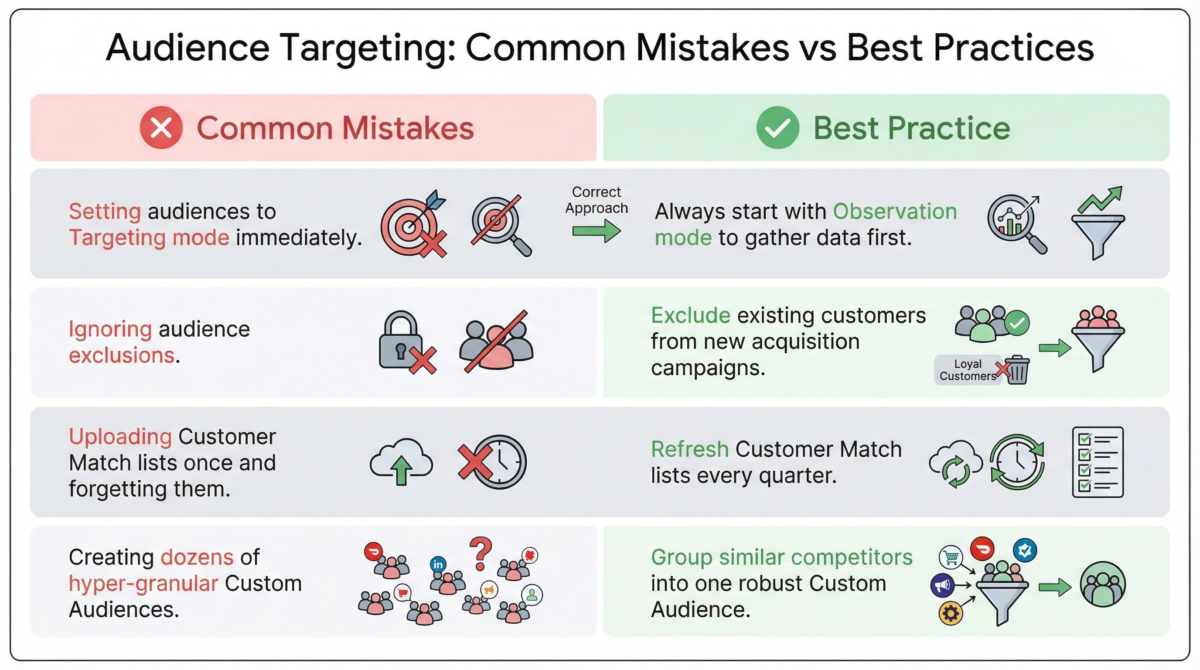
Mistake 1: Using “Targeting” Mode Prematurely
As mentioned earlier, setting an audience to “Targeting” mode in a Search campaign restricts your ads to only show to people in that specific audience. Unless you are running a highly specific remarketing campaign (RLSA), always start with “Observation” mode. This allows you to gather data without artificially strangling your campaign volume.
Mistake 2: Ignoring Audience Exclusions
Audience targeting is not just about who you include; it is equally about who you exclude. If you are running a campaign designed to acquire net-new customers, you must exclude your Customer Match lists (existing customers) to avoid wasting budget on people who have already converted. Similarly, if you offer a high-end enterprise solution, you might want to exclude In-Market audiences related to “Free Software” or “Student Discounts.”
Mistake 3: Failing to Update Customer Match Lists
Customer Match lists degrade over time. People change email addresses, move jobs, or switch phone numbers. If you upload a list and never touch it again, its match rate and effectiveness will steadily decline. Make it a habit to refresh your Customer Match lists at least once a quarter, or integrate your CRM directly with Google Ads (using tools like Zapier or native integrations) for automated, real-time updates.
Mistake 4: Over-Segmenting Custom Audiences
While specificity is good, creating dozens of hyper-granular Custom Audiences can dilute your data and make it impossible to draw statistically significant conclusions. Instead of creating ten different Custom Audiences for ten different competitor URLs, group similar competitors into a single, robust Custom Audience. This provides the algorithm with enough data to optimize effectively.
6. Advanced Bidding Strategies with Audiences
Once you have layered your audiences and gathered sufficient data through the Observation method, the next step is to integrate this intelligence with Google’s automated bidding strategies (Smart Bidding). While manual bid adjustments (e.g., +20% for a Custom Audience) are effective for manual CPC or Enhanced CPC campaigns, Smart Bidding requires a different approach.
Smart Bidding and Audience Signals
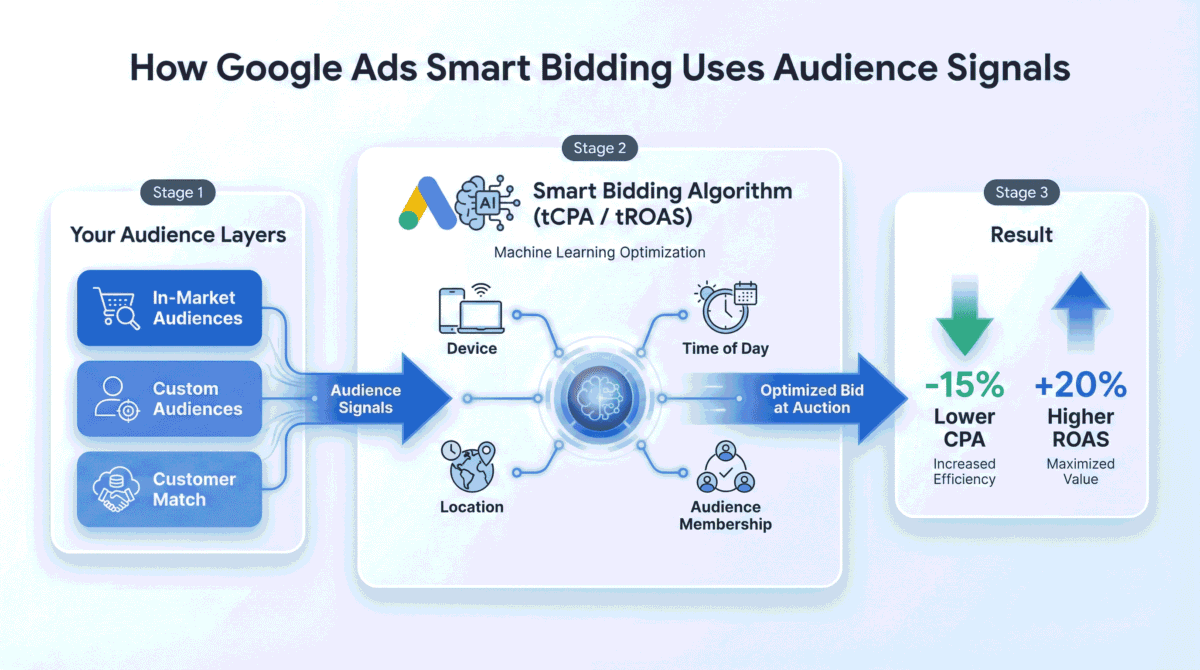
If you are using Target CPA (tCPA) or Target ROAS (tROAS) bidding strategies, Google’s algorithm already factors in user signals—including audience membership—when setting bids at auction time. However, this does not mean you should ignore audience targeting in Smart Bidding campaigns.
Instead of manual bid adjustments, you use audiences as Signals.
By adding In-Market, Custom, and Customer Match audiences to a Smart Bidding campaign (even in Observation mode), you are providing the machine learning algorithm with a clearer picture of your ideal customer. You are essentially saying, “Pay special attention to users who fall into these categories, as they are historically more valuable to us.” This helps the algorithm learn faster and optimize more effectively, especially during the initial learning phase of a new campaign or when budget is limited.
The Value-Based Bidding Transition
For intermediate to advanced marketers, the ultimate goal is transitioning to Value-Based Bidding (VBB). This strategy goes beyond simply acquiring a conversion (Target CPA) and focuses on maximizing the total value of those conversions (Target ROAS).
Audience targeting is critical for VBB success. By segmenting your Customer Match lists by Lifetime Value (LTV), as discussed earlier, you can train the algorithm to bid more aggressively for users who resemble your high-value VIPs, rather than just any user who might convert at a low value. This synergy between first-party data (Customer Match) and machine learning (Target ROAS) is currently one of the most powerful strategies in the Google Ads ecosystem.
7. Measuring Audience Performance in Google Analytics 4 (GA4)
While the Google Ads interface provides excellent data on how your audiences are performing in terms of clicks, cost, and immediate conversions, it often fails to tell the complete story of the user journey. To truly understand the impact of your audience targeting, you must integrate your analysis with Google Analytics 4 (GA4).
The GA4 Audience Advantage
GA4 allows you to build highly complex audiences based on on-site behavior, event triggers, and predictive metrics (e.g., users likely to purchase in the next 7 days). These GA4 audiences can then be seamlessly imported back into Google Ads as Custom Audiences.
More importantly, GA4 provides a holistic view of how different audience segments interact with your website post-click.
•Engagement Rate: Are users from your “Competitor Intercept” Custom Audience bouncing immediately, or are they exploring multiple pages?
•Path to Conversion: Are users from your In-Market audiences converting on their first visit, or do they require multiple touchpoints across different channels (e.g., clicking a Search ad, then returning via an organic search two days later)?
•Lifetime Value Tracking: GA4 allows you to track the long-term value of users acquired through specific Google Ads audience segments, providing a more accurate picture of ROAS than the standard 30-day conversion window in Google Ads.
By analyzing this deeper behavioral data in GA4, you can refine your Google Ads audience strategy, pausing segments that drive cheap clicks but low engagement, and scaling segments that drive long-term, high-value customers.
Conclusion: Moving Beyond Keywords
The digital advertising landscape has evolved far beyond simple keyword matching. Today, success in Google Ads requires a deep understanding of the user behind the search query. By moving beyond a keyword-only strategy and embracing the power of In-Market Audiences, Custom Audiences, and Customer Match, you can transform your campaigns from broad nets into precision instruments.
Audience targeting allows you to gather intelligence, intercept competitors, leverage your most valuable asset (first-party data), and ultimately, spend your budget more efficiently. It is the difference between hoping for a conversion and engineering one.
Start by implementing these three audience types in Observation mode today. Gather the data, analyze the performance, and begin applying strategic bid adjustments. The results—in the form of lower CPAs and higher ROAS—will speak for themselves.
Need Expert Help Implementing These Strategies?
If you are unsure how your current audience targeting is set up, or if you suspect you are leaving money on the table with a keyword-only approach, professional guidance can make all the difference.
Implementing advanced audience layering, managing first-party data uploads, and optimizing bid adjustments requires technical expertise and a deep understanding of the Google Ads ecosystem.
I offer comprehensive Google Ads Management Services designed to audit your current setup, identify missed opportunities, and implement these advanced audience strategies to drive measurable improvements in your CPA and ROAS.
Stop guessing and start optimizing. Let’s build a Google Ads strategy that targets the right people, at the right time, with the right message.
 Contact Me for a Free Google Ads Audit and Strategy
