

Why Your Med Spa Google Ads Are Bleeding Money (And Exactly How to Fix Them)
April 7, 2026
Google Ads for Moving Companies: The 3-Part Setup That Actually Works
April 9, 2026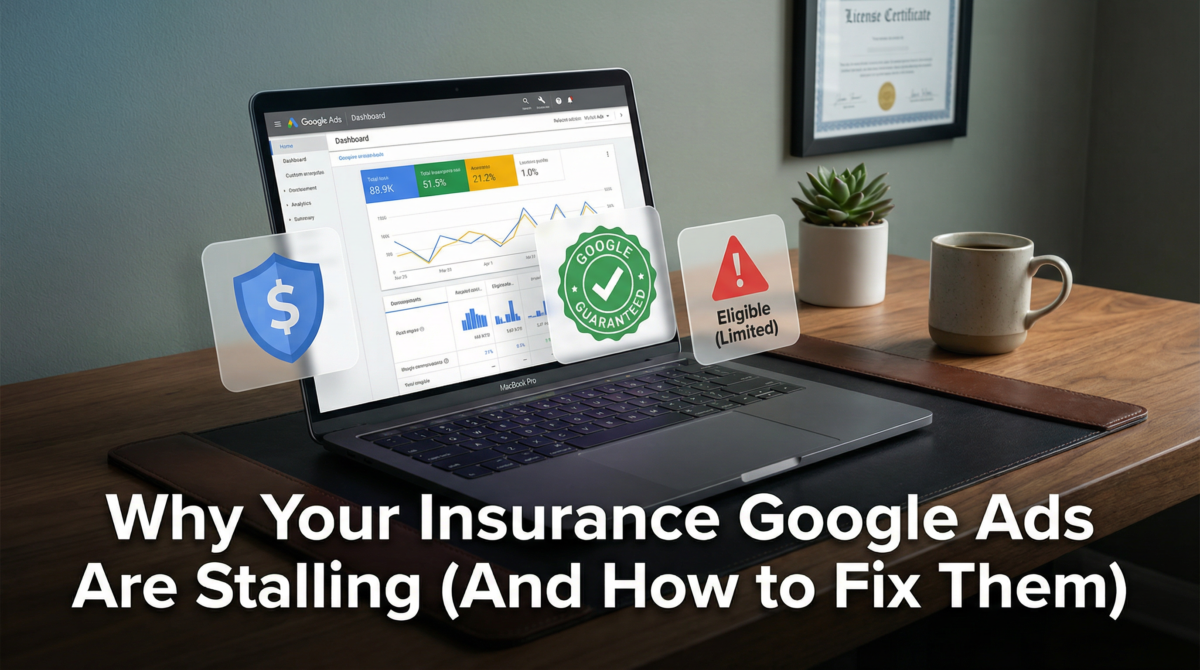
You’ve finally done it. You set aside a healthy marketing budget, spent hours picking the perfect keywords, wrote what you thought was compelling ad copy, and hit “Enable” on your new Google Ads campaign.
Then, you wait. You check the dashboard the next morning. Nothing. You check it three days later. A handful of impressions, maybe two clicks, and absolutely zero phone calls. Your ads are either sitting completely stagnant with a frustrating “Eligible (Limited)” status, or worse, they are burning through your $50 daily budget in ten minutes on clicks from people searching for “free car insurance quotes no deposit.”
If this sounds familiar, take a deep breath. You are not alone. I’ve audited dozens of Google Ads accounts for independent insurance agencies and massive brokerages alike, and I see the exact same patterns every single time.
The problem is almost never your budget, and it’s rarely your market. The problem is that insurance is one of the most heavily restricted, fiercely competitive, and structurally demanding niches on the entire Google Ads platform. You cannot run an insurance campaign the same way you run a campaign for a local plumber or a landscaping company.
Let’s break down exactly why your insurance ads are stalling, the hidden policies holding you back, and the exact steps you need to take to turn your Google Ads account into a predictable lead-generation machine.
1. The Red Tape: Google’s Financial Products Policies
The biggest shock to most new insurance advertisers is discovering that Google doesn’t treat insurance like a normal local business. Google classifies insurance under its “Financial Products and Services” policy. This means you are subjected to a level of scrutiny that most other industries never have to deal with.
The Verification Bottleneck
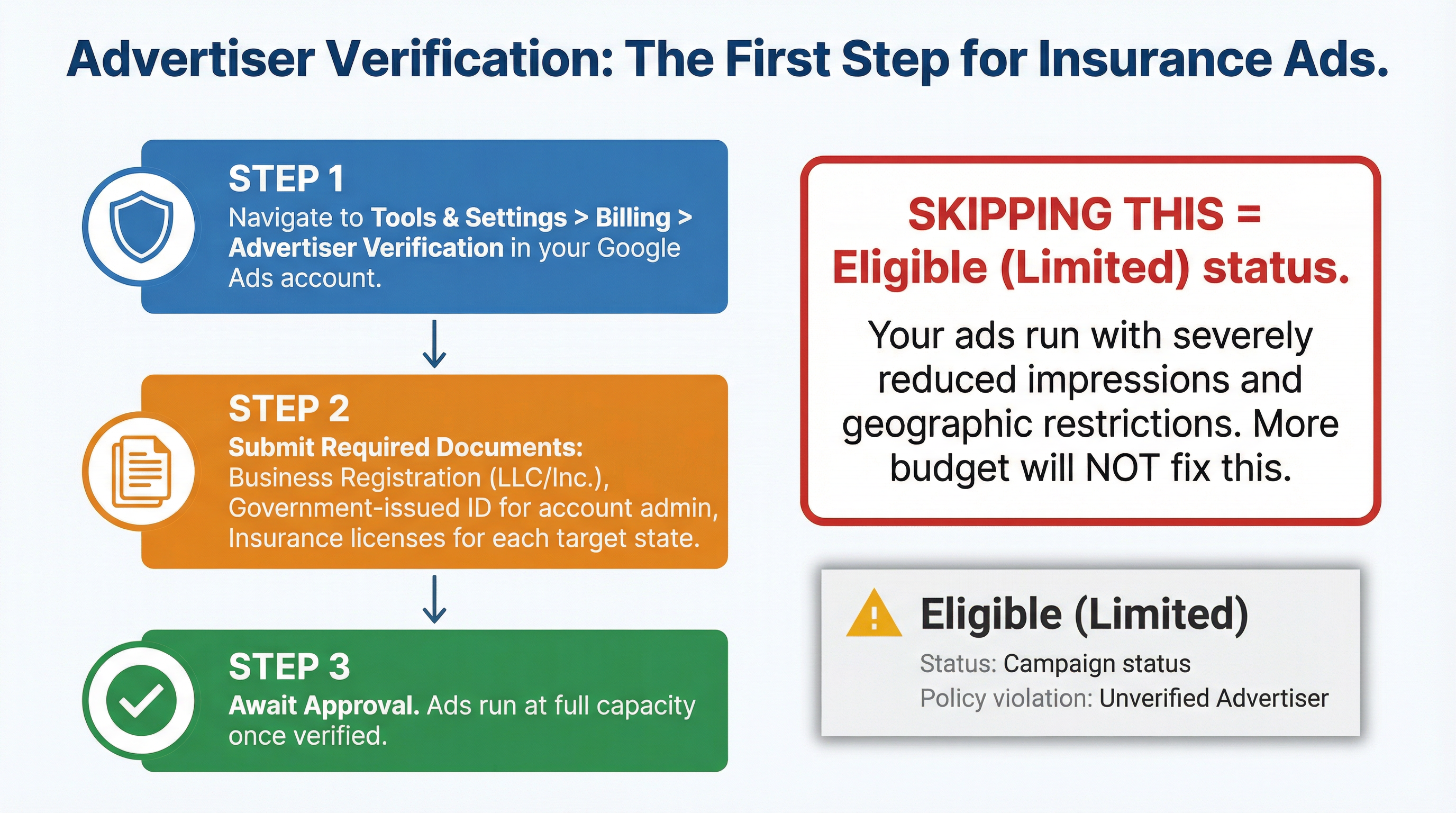
Before your ads can run at full capacity, you have to prove to Google that you are who you say you are, and that you are legally allowed to sell what you are selling. This is called Advertiser Verification.
If you skip this step, or if your documentation doesn’t perfectly match the business name on your website and the billing details in your Google Ads account, your ads will either be paused entirely or severely throttled. You will see that dreaded “Eligible (Limited)” status, which essentially means Google is letting your ads run, but with handcuffs on. They won’t show to certain demographics, they won’t show in certain regions, and your impression share will tank.
How to Clear the Hurdle
Stop tweaking your bids and fix your paperwork. Go to the “Tools & Settings” menu in your Google Ads dashboard, navigate to “Billing,” and find the “Advertiser verification” section.
You will need to provide:
- Your official business registration documents (LLC, Inc., etc.)
- A government-issued ID for the account admin
- Proof of your insurance licenses for the specific states you are targeting
If you are licensed in Texas but you are running ads targeting people in Oklahoma without submitting an Oklahoma license, Google will catch it, and they will restrict your ads. Get your verification completed and approved before you spend another dime on clicks.
2. The “Junk Drawer” Campaign Structure
Once you’ve cleared the policy hurdles, the next thing that will completely destroy your ROI is a lazy campaign structure.
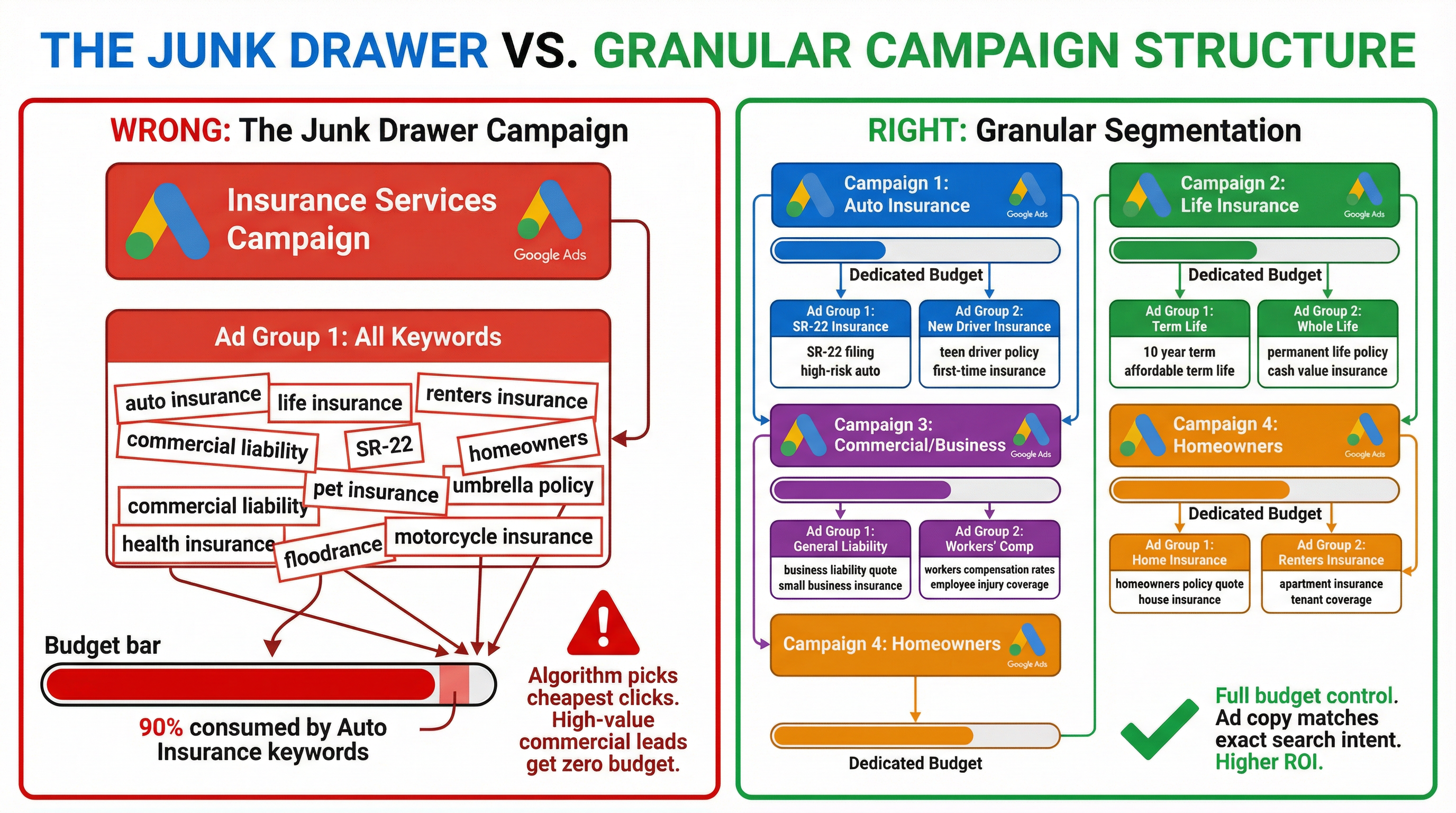
The most common mistake I see is what I call the “Junk Drawer” campaign. An agent creates one single campaign, names it “Insurance Services,” and throws every single keyword they can think of into one ad group. They have “auto insurance,” “life insurance quotes,” “cheap renters insurance,” and “business liability coverage” all sitting right next to each other, sharing the exact same daily budget.
Why This Destroys Your Budget
Google’s algorithm is smart, but it’s also lazy. If you give it a $100 daily budget and tell it to find clicks for both auto insurance and commercial liability insurance, it’s going to take the path of least resistance.
Auto insurance has massive search volume and lower CPCs (Cost Per Click) compared to commercial policies. The algorithm will spend your entire $100 by 9:00 AM on people looking for cheap car insurance, leaving absolutely zero budget for the high-margin, high-value commercial leads you actually want.
Furthermore, if someone searches for “term life insurance rates” and your ad headline says “Best Local Insurance Agency – Auto & Home,” they aren’t going to click it. Your ad relevance drops, your Quality Score plummets, and Google starts charging you a premium just to show up.
The Fix: Granular Segmentation
You need to isolate your variables. Every distinct type of insurance you sell needs its own dedicated campaign.
- Campaign 1: Auto Insurance
- Campaign 2: Homeowners Insurance
- Campaign 3: Life Insurance
- Campaign 4: Commercial/Business Insurance
By separating them at the campaign level, you take back control of your money. If commercial policies drive the most revenue for your agency, you can allocate 60% of your total budget strictly to that campaign.
Within those campaigns, break your ad groups down by specific intent. Under the Auto Insurance campaign, you shouldn’t just have one ad group. You should have one ad group for “SR-22 insurance,” one for “new driver insurance,” and one for “bundled auto and home.” This allows you to write hyper-specific ad copy that matches exactly what the user typed into the search bar, driving your click-through rates up and your costs down.
3. Bleeding Cash on Irrelevant Searches
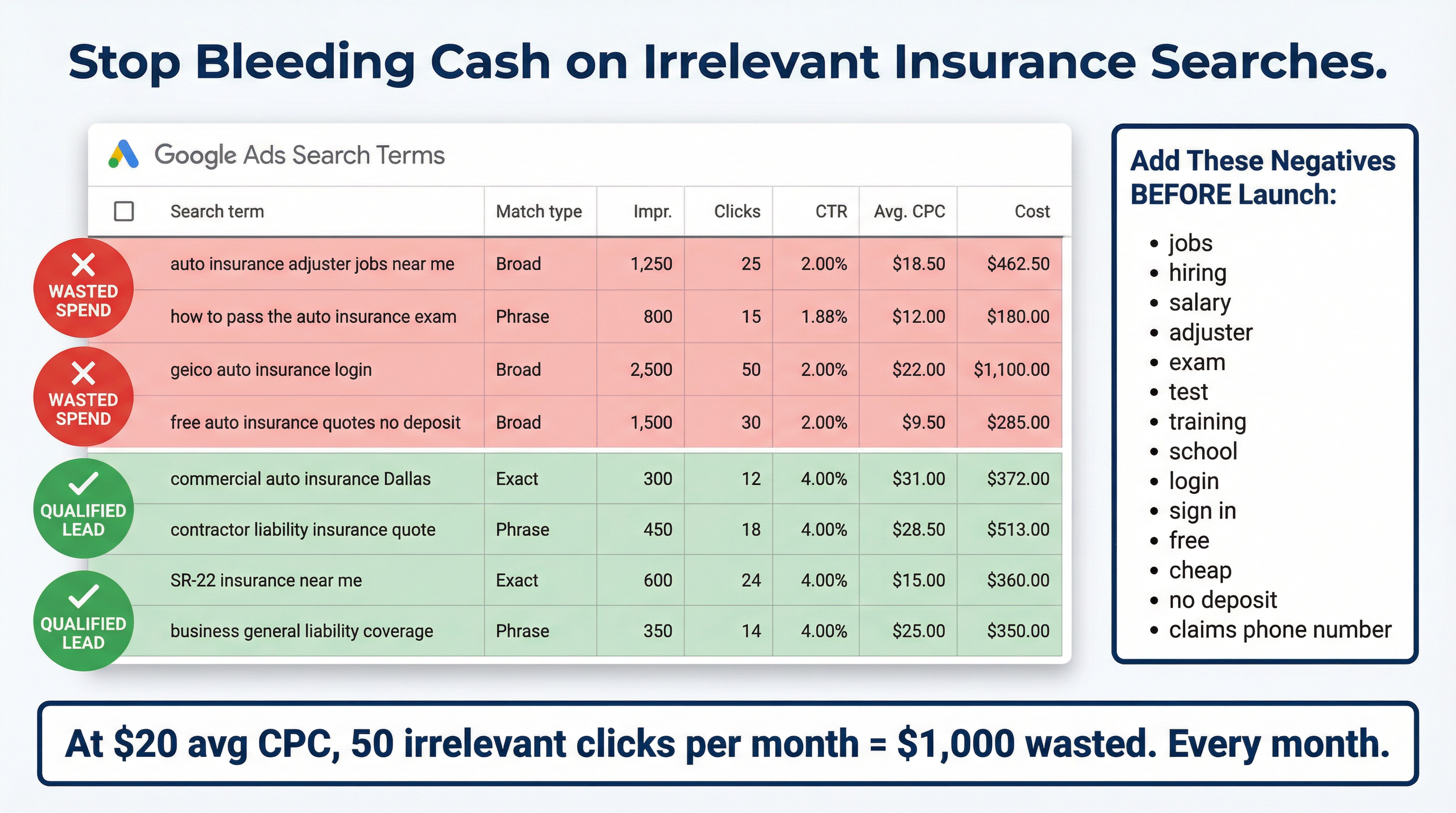
Insurance keywords are incredibly expensive. Depending on your market, a single click for “commercial auto insurance” can easily cost between $15 and $50. When you are paying that much for a single click, you cannot afford to be sloppy with your targeting.
The Danger of Broad Match
If you add the keyword auto insurance to your campaign without any modifiers (like brackets or quotation marks), Google treats it as a Broad Match keyword. This gives Google the liberty to show your ad for anything it deems “loosely related” to auto insurance.
You will end up paying $20 a click for searches like:
- “auto insurance adjuster jobs near me”
- “how to pass the auto insurance exam”
- “geico auto insurance login”
- “free auto insurance quotes no deposit”
None of these people are going to buy a policy from you. They are looking for employment, study materials, their existing customer portal, or something you likely don’t offer.
The Fix: Match Types and Negative Keywords
First, tighten up your match types. Rely heavily on Phrase Match (e.g., "auto insurance quotes") and Exact Match (e.g., [commercial liability insurance]). This forces Google to only show your ads when the user’s search closely matches your actual keyword.
Second, you need to build a robust negative keyword list before your campaign even launches. A negative keyword tells Google, “Never show my ad if the user includes this word in their search.”
Every insurance agency should immediately add these to their negative list:
- Employment terms: jobs, hiring, salary, resume, careers, adjuster
- Education terms: exam, test, practice, license, school, training
- Competitor logins: login, sign in, customer service number, claims phone number
- Low-intent terms: free, cheap, no deposit, instant (unless these are specifically part of your business model)
Check your “Search Terms” report twice a week. When you see a garbage search term that cost you money, check the box next to it and add it as a negative keyword immediately.
4. Sending High-Intent Traffic to a Low-Converting Homepage
Let’s assume you’ve fixed your verification, structured your campaigns perfectly, and dialed in your negative keywords. Someone searches for “contractor liability insurance Dallas,” they see your highly relevant ad, and they click.
Where do they land?
If you are sending them to your agency’s main homepage, you are actively sabotaging your own success.
The Homepage Distraction Trap
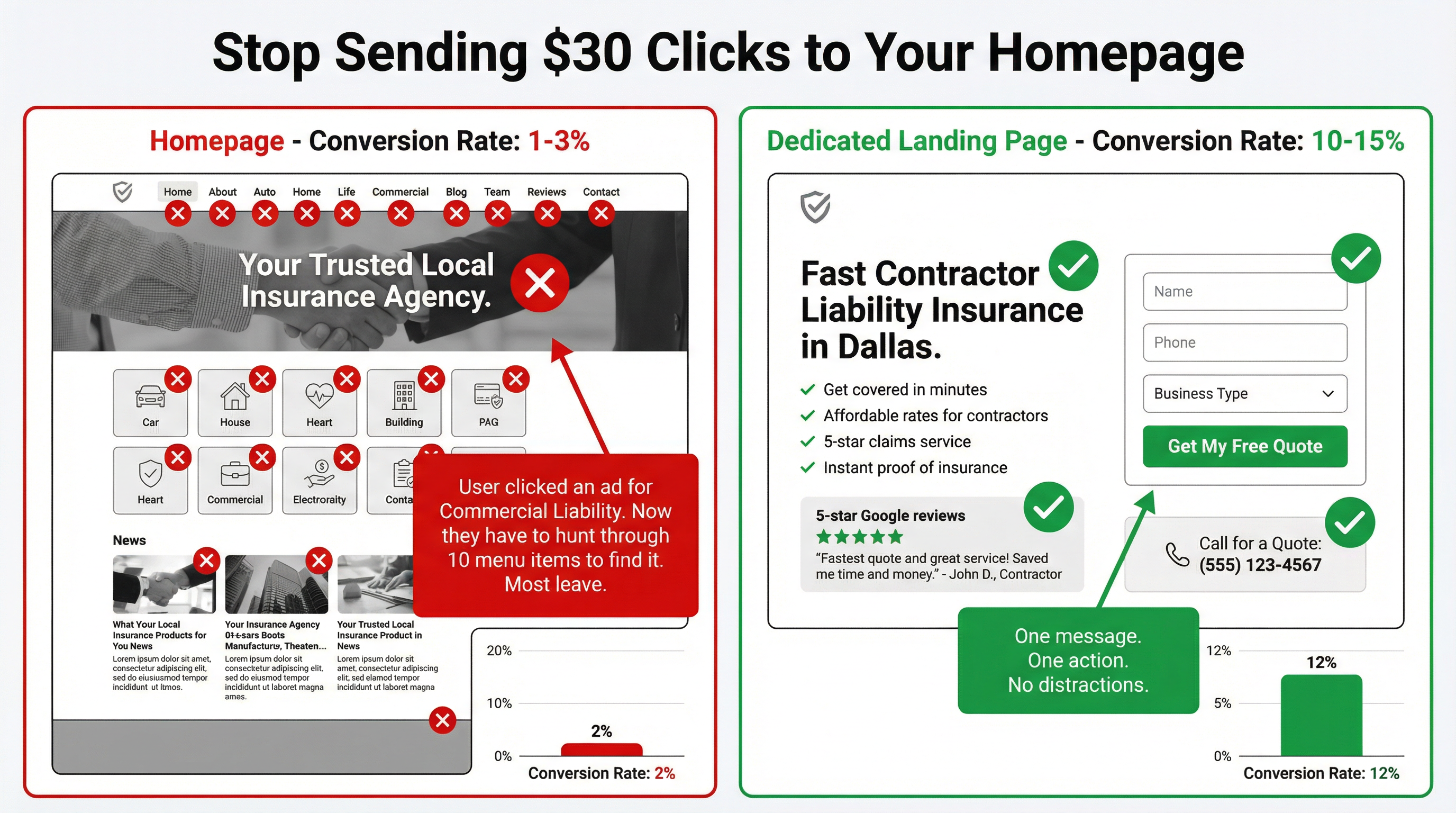
Your homepage is designed to be a digital brochure. It has a navigation menu with links to your “About Us” page, your blog, your team photos, and a massive list of all 15 types of insurance you sell.
When a user clicks an ad for contractor liability insurance, they have a very specific problem they need solved right now. If they land on your homepage, they have to hunt through your menus to find the commercial section, read through generic text, and figure out how to contact you.
Most people won’t do that. The modern consumer has the attention span of a goldfish. If they don’t see exactly what they are looking for within three seconds, they will hit the back button and click on the Geico or Progressive ad right below yours.
The Fix: Dedicated Landing Pages
Every campaign needs a dedicated, standalone landing page.
If the ad is about commercial liability, the page they land on should talk about absolutely nothing except commercial liability.
- The Headline: Needs to explicitly state what the page is about (e.g., “Fast, Affordable Contractor Liability Insurance in Dallas”).
- The Copy: Should speak directly to the pain points of contractors (e.g., needing a certificate of insurance quickly to get on a job site).
- The Distractions: Remove the top navigation menu. Do not give them the option to wander off to your blog.
- The Call to Action (CTA): Make it frictionless. Put a simple quote request form right at the top of the page, alongside a clickable phone number.
A tight, highly relevant landing page can easily double your conversion rate without you having to spend a single extra dollar on ad clicks.
5. Ignoring Local Services Ads (The Google Guaranteed Badge)
If you are a local insurance agency and you are only running standard Search ads, you are leaving the best leads on the table.
In recent years, Google rolled out Local Services Ads (LSAs) for the insurance industry, and they operate on a completely different paradigm than traditional pay-per-click ads.
The Pay-Per-Lead Advantage
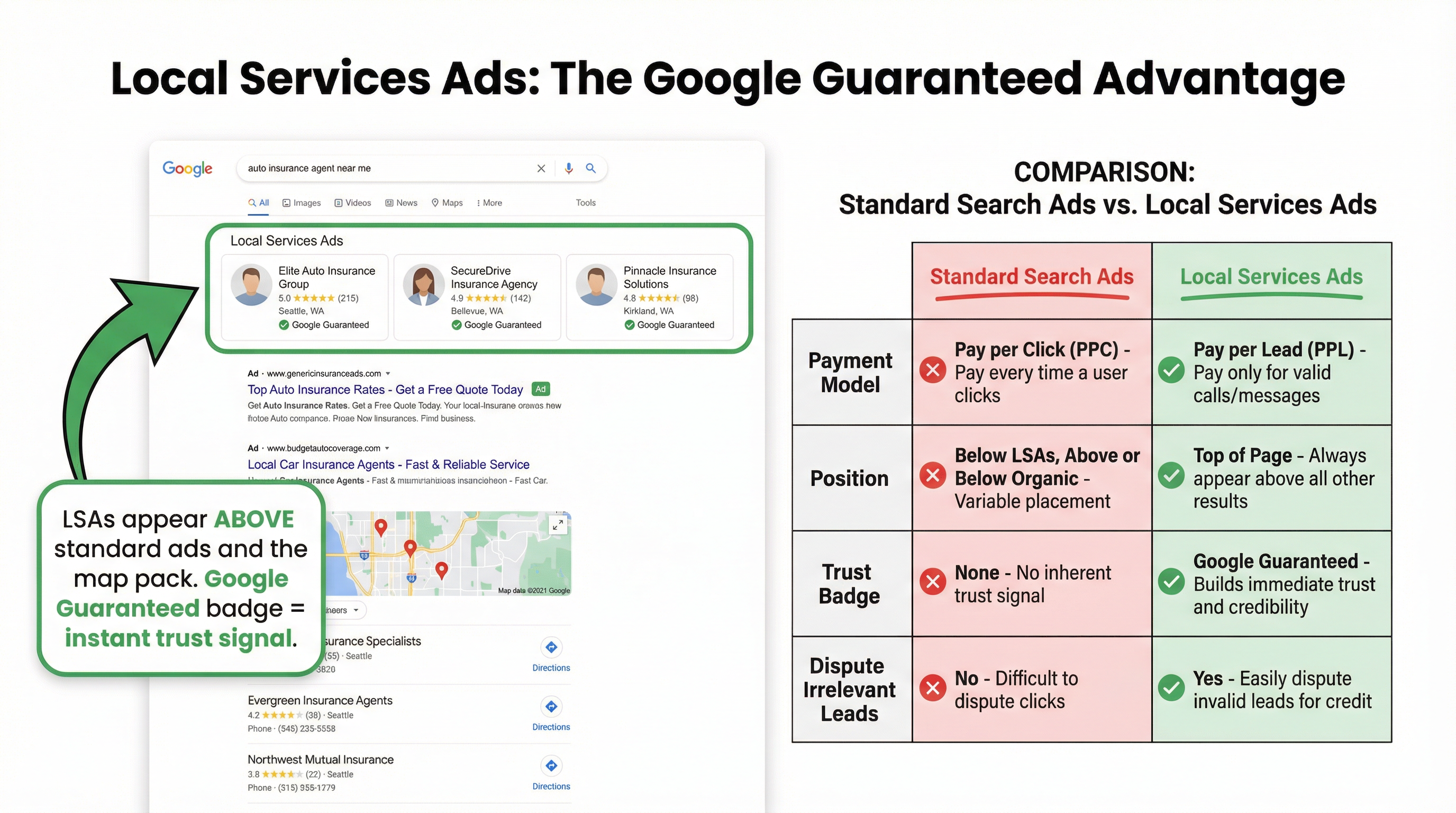
With traditional Google Ads, you pay every time someone clicks your ad, regardless of whether they actually call you or fill out a form. You take on all the risk.
With Local Services Ads, you pay per lead. You only pay when a customer actually calls your agency or sends you a message through the platform. If someone calls and tries to sell you SEO services, or if it’s a wrong number, you can dispute the charge with Google and get your money back.
The Trust Signal
Even more importantly, LSAs appear at the very top of the search results page—above the standard text ads and above the map pack.
To run LSAs, you have to pass a rigorous background check and license verification process. Once you pass, Google slaps a green “Google Guaranteed” badge on your listing.
Think about this from the consumer’s perspective. They search for “auto insurance agent near me.” At the very top of the page, they see your headshot, your 5-star review rating, and a green checkmark that says Google backs your business. It is the ultimate trust signal, and it completely changes the dynamic of the phone call when they reach out to you.
Availability for LSAs varies depending on your state and the specific lines of insurance you carry, but if you are eligible, setting this up should be your top priority.
The Bottom Line
Running Google Ads for an insurance agency is not for the faint of heart. The clicks are expensive, the policies are strict, and the competition is fierce.
But it absolutely works.
When an insurance campaign fails, it’s rarely because “Google Ads doesn’t work in my city.” It fails because the advertiser treated a complex, highly regulated financial product the same way they would treat a local pizza shop.
If your ads are stalling, stop throwing more budget at the problem. Take a step back and fix the foundation. Complete your advertiser verification. Break your “junk drawer” campaign into isolated, highly targeted segments. Build an aggressive negative keyword list. Stop sending expensive traffic to your homepage. And if you are eligible, get your Google Guaranteed badge and start running Local Services Ads.
When you align your account structure with Google’s rules and the user’s actual search intent, the platform transforms from a frustrating expense into the most predictable, scalable lead-generation engine your agency has ever had.
Need a Second Set of Eyes on Your Account?
If you’re reading this and realizing your Google Ads account might be suffering from some of these foundational cracks, don’t panic. The fastest way to stop the bleeding is to have an expert look under the hood.
I offer comprehensive Google Ads audits specifically for insurance agencies. We’ll look at your campaign structure, your policy restrictions, your wasted spend, and your landing pages to identify exactly where your budget is leaking and what you need to do to fix it.
Get in touch today to schedule your free audit →

2 Comments
This was a solid read. Insurance is such a competitive space, and even small setup issues can make campaigns stall fast. I appreciate that this article focuses on the structure and strategy behind performance, not just surface-level metrics.
Hi Jolene, thank you for your comment. That is very true. Insurance campaigns can be heavily affected by setup issues, especially in a competitive market. A strong structure and clear strategy are often what make the difference between stalled performance and steady results.